Hallo,
ich habe gerade ein WIndows 11 image auf einem neuen Lenovo Rechner (all-in-one) erstellt.
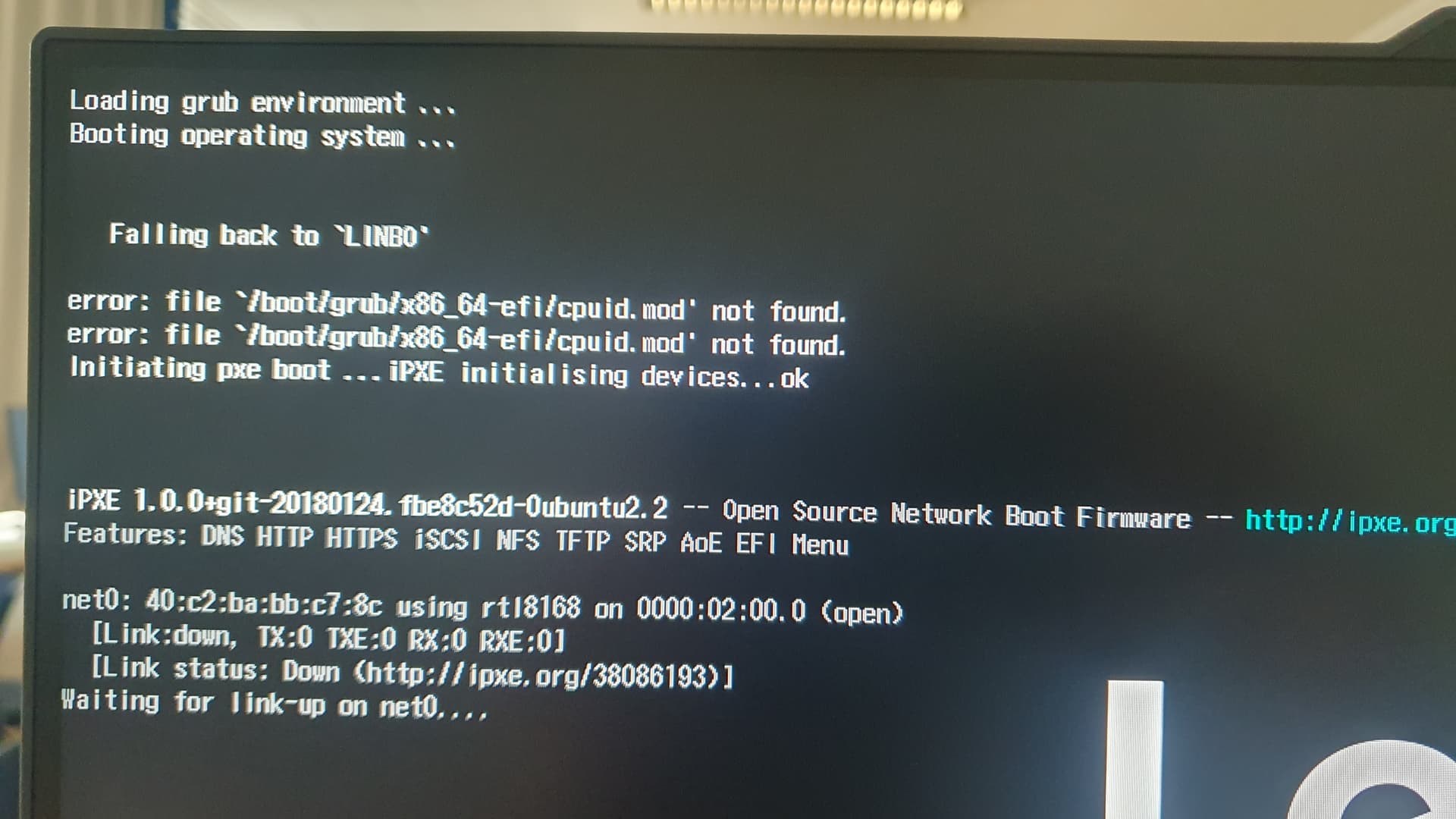
Dies wollte ich gerade auf einen anderen Rechner syncen. Leider erscheint beim booten die Fehlermeldung, dass grub die Datei /boot/grub/x86_64-efi/cpuid.mod nicht findet.
Siehe auch das Foto im Anhang
Was mache ich falsch?
Danke
Hallo,
also die Datei * /boot/grub/x86_64-efi/cpuid.mod* liegt auf dem Rechner
Hier noch die start.conf
[LINBO]
Server = 10.16.1.1
Group = win11-Robotik
Cache = /dev/nvme0n1p4
RootTimeout = 600
AutoPartition = no
AutoFormat = no
AutoInitCache = no
DownloadType = rsync
GuiDisabled = no
UseMinimalLayout = no
Locale = de-DE
SystemType = efi64
KernelOptions = quiet splash dhcpretry=6 noefibootmgr
clientDetailsVisibleByDefault = yes

[Partition]
Dev = /dev/nvme0n1p1
Label = efi
Size = 200M
Id = ef
FSType = vfat
Bootable = yes

[Partition]
Dev = /dev/nvme0n1p2
Label = msr
Size = 128M
Id = 0c01
FSType =
Bootable = no

[Partition]
Dev = /dev/nvme0n1p3
Label = windows
Size = 150G
Id = 7
FSType = ntfs
Bootable = no

[Partition]
Dev = /dev/nvme0n1p4
Label = cache
Size = 250G
Id = 83
FSType = ext4
Bootable = no

[Partition]
Label = data
Dev = /dev/nvme0n1p5
Size =
Id = 7
FSType = ntfs
Bootable = no

[OS]
Name = Windows 11
Version = 11
Description = Windows 11
IconName = win10.svg
Image =
BaseImage = win11-Robotik.qcow2
Boot = /dev/nvme0n1p3
Root = /dev/nvme0n1p3
Kernel = auto
Initrd =
Append =
StartEnabled = yes
SyncEnabled = yes
NewEnabled = yes
Autostart = no
AutostartTimeout = 5
DefaultAction = start
Hidden = yes