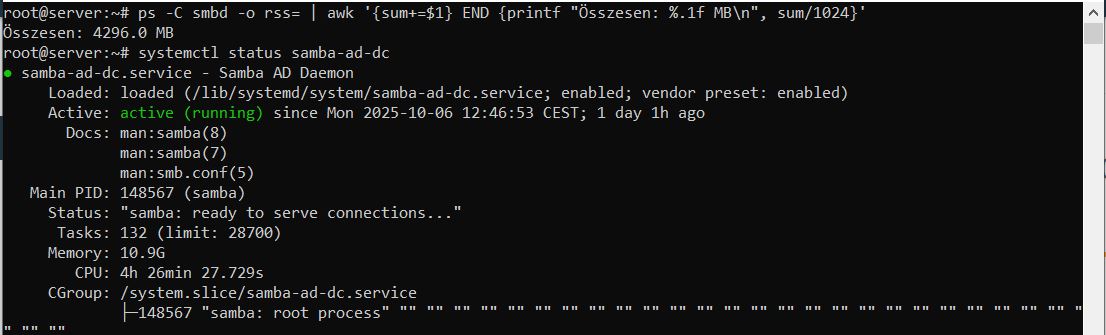
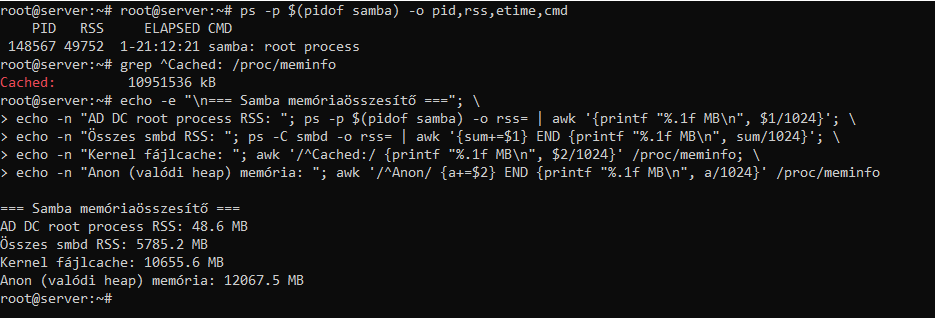
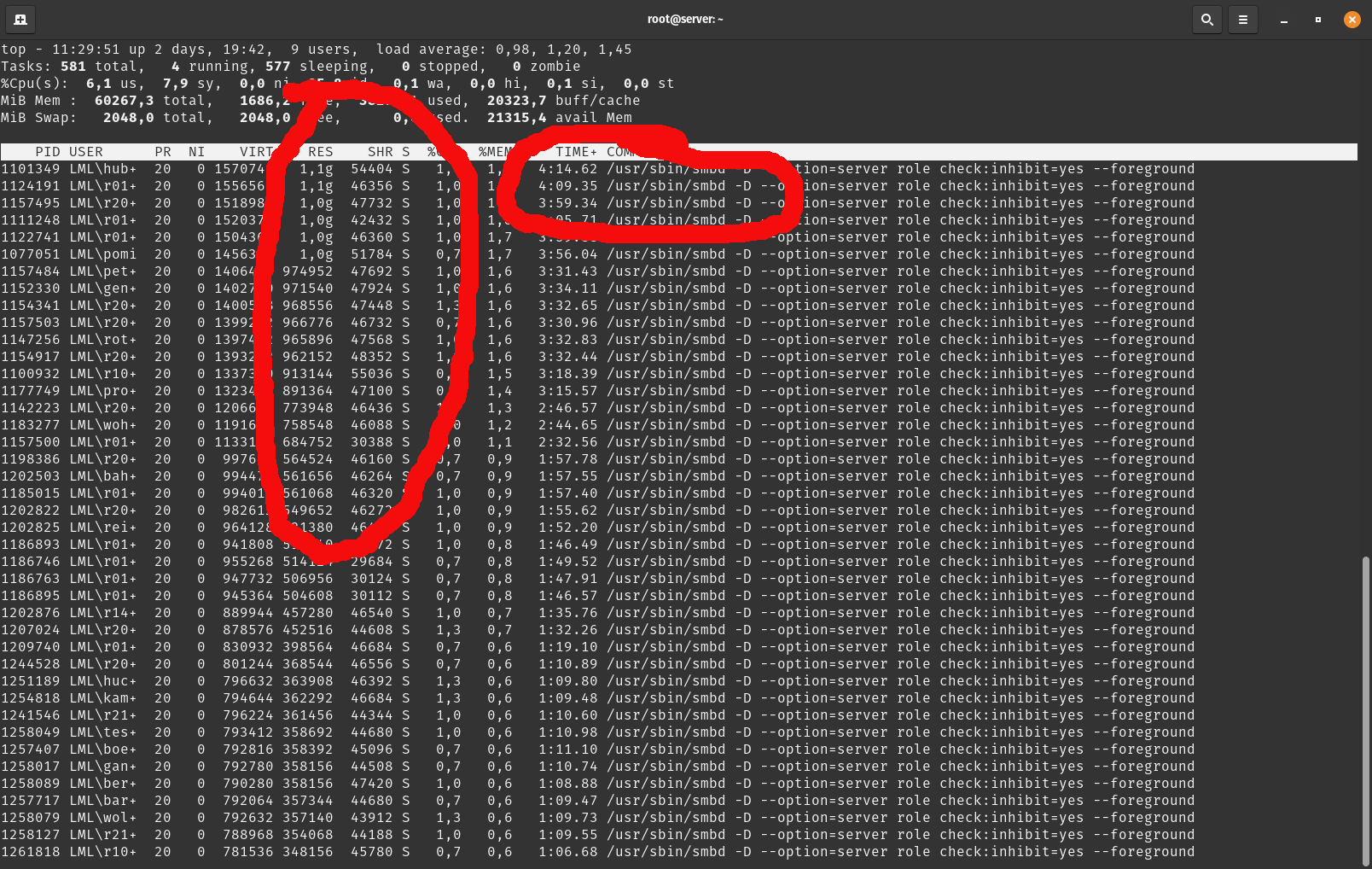
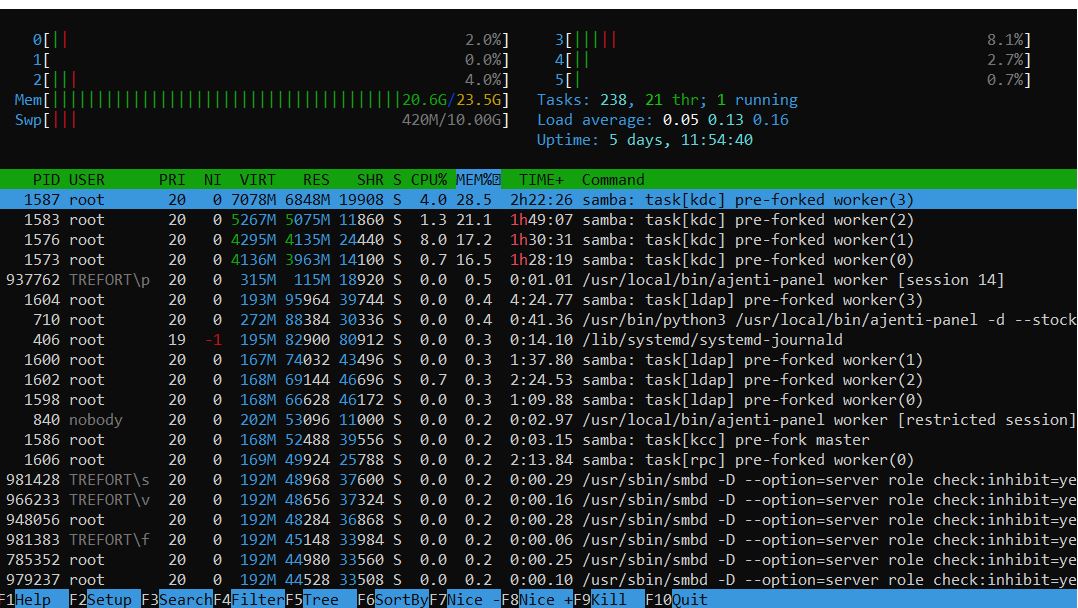
Neither Nextcloud nor Edulution.io is installed, only Opnsense 25.1.12 and the latest 7.2 lmn and Ubuntu server 22.04 under Proxmox (8.4.14). There is also a Windows 10 x86 client vm running without a proxy, but only the library server program is allowed to go out (to a single external IP address), everything else is blocked by opnsense. This is shared with two domain clients and users who use the library program. unfortunately, it is quite outdated and does not work with a proxy at all, so this was the only way I could solve it securely, but I don’t think this has anything to do with it, because until I updated Samba, I had similar memory consumption as you mention, this 7.3 GB was now only brought together by 3 processes, but during the day it was over 100.
meines Wissens nach hat das bisher bei jedem funktioniert, seit die lmn 7.3 final ist.
Deine Erläuterungen sind auch nicht wirklich erhellend.
Kannst du uns nicht mal die Logdateien eines fehlgeschlagenenen Upgrades schicken?
Oder wenigstens wie die Quellendateien unter /etc/apt/sources.d/lmn.list (und andere vor dem Upgrade und danach aussehen?
Oder mal eine Beschreibung, was genau du gemacht hast um das upgrade durch zu führen.
Problem: Upgrade von Ubuntu auf 24.04 bockt, da irgendwas mit GRUB nicht tut
das hab ich dann irgendwie gefixt und das lief mit dem linuxmuster-release-upgrade durch
das Migrationsskript sucht aber immer ein neueres Release, sonst macht es nicht weiter, also bringt der zweite Start nix mehr bzgl. 7.2 auf 7.3, da Abbruch
Skript geaendert und gestartet, Problem: irgendein resolv.conf-Fehler, vermute Ubuntu hat das beim Upgrade irgendwohin verlinkt und das Skript meckert => Link geloescht und nochmal
Dann kam das Problem mit den Paketen, deren Signatur nicht ueberprueft werden kann, also fehlte wohl der Public Key im Schluesselbund um die Signatur der Pakete zu ueberpruefen, Es koennte sein, dass sich da was verschluckt hat, da in sources.list.d noch lmn1 und lmn2 verlinkt waren, dazu lmn.list (7.3) , das hab ich dann auch irgendwie hingebogen und ich glaube das lief dann durch. Im Moment tut das Ding wohl was es soll, grosses Vertrauen hab ich aber gerade nicht.
Dann muss ich jetzt wirklich mal schauen wie ich vorzeitig in den Ruhestand komme oder „bei jedem“ bedeutet das hat noch niemand probiert.
Oder die Migration wurde von ein paar flinken Fingern von netzint oder den restlichen Gurus hier mal eben mit ein paar schnellen Bugfixes durchgezogen, von wegen „wie jeder weiss muss man die alten Listen in sources.list.d fixen“ oder „naja, wenn das Migrationsskript beim ersten Mal crasht muss ich den alten Snapshot zurueckspielen, das GRUB-Problem, welches nur beim Upgrade von 22.04 auf 24.04 auftaucht, proaktiv schon vorher loesen und das dann nochmal anwerfen.“
Ich weiss das ist OSS und ich kann’s ja fixen, bin aber froh wenn ich das System am Laufen halten kann (offensichtlich nur mit grossem Zeitaufwand).
Eigentlich wolte ich ja nur das Problem mit dem Speicherleck loesen und mit der Migration noch warten, das war aber ohne Migration nicht loesbar, zumindest nicht fuer mich.
Vielleicht sollte man mal eine Umfrage machen, wer das Migrationsskript erfolgreich ohne Probleme durchgezogen hat.
aber das passt doch zusammen: Wenn das Ubuntu-Releaseupgrade nicht durchläuft, bricht auch das Linuxmuster-Upgrade ab. Das kann man dem Linuxmuster-Skript jetzt nicht wirklich vorwerfen.
Ein Fix müsste also darin bestehen, das man vorher das System in einen Zustand bringt, in dem das Ubuntu-Upgrade durchläuft. Oder man macht es wie Du und bastelt an dem Linuxmuster-Skript herum, sodass man es wiederholt anwerfen kann.
Falls das vielen passiert, wäre es vielleicht auch ein FR für das Upgrade-Skript - ein Schalter „fang nochmal nach dem Ubuntu-Upgrade an“.
Ärgerlich finde ich vor allem,dass das Ubuntu-Upgrade so unzuverlässig ist. Die Bugs sind bekannt, werden aber nicht zuverlässig gefixt. Mir hat das letzte Upgrade mein privates Notebook so zerschossen, dass nur eine Neuinstallation blieb.
Ich vermute (!), dass viele Admins schon ausgestiegen sind und das alles netzint und Co. machen lassen, da sie dauernd auf die Schnauze geflogen sind. Das System ist so komplex geworden, dass es schwierig ist das fuer Nebenberufsadmins, die sich nicht 10h am Tag damit beschaeftigen, alleine zu installieren/upgraden…, glaube das war auch mal die Arbeitsbeschreibung fuer Netzberater: User einpflegen und Passwoerter aendern.
Wie schon geschrieben, kann auch nur an mir liegen.
du hast einfach Pech. Ich habe in den Sommerferien mein lmn7.2, das auch irgendwann von nativem KVM auf Proxmox umgezogen ust, auf lmn7.3 aktualisiert. Dabei musste ich die lmn7.2 Testing Quellen auskommentieren. Dazu gab es in den Fehlermeldungen aber einen Hinweis. Der Rest lief sauber und erstaunlich schnell durch. Das heißt ja nicht, dass es bei allen problemlos laufen muss. Deine Situation ist immerhin nicht ungetestet.
Falls möglich, würde ich vom funktionierenden lmn7.2 wie empfohlen das Upgrade erneut versuchen und mdie Fehlermeldungen systematisch abarbeiten.
Auf jeden Fall viel Glück.
Kann ich hier leider nicht nachvollziehen. Wenn es Infos gäbe, welche Konstellation ein GRUB-Problem beim Upgrade veranlasst, könnte man das evtl. im Vorfeld abfangen. Ich sehe aber auf github diesbzgl. keinen Issue.
Die sources.list-Dateien, die nicht von Ubuntu stammen, werden beim Upgrade vom Ubuntu-Upgradetool deaktiviert. Da muss linuxmuster.net seitig nichts getan werden.
Abend,
nach langem hin und her läuft jetzt 7.3 und das Speicherleck scheint Geschichte, RAM-Bedarf ist ultraentspannt und er läuft auch nicht mehr mit der Zeit voll, das freut.
Irgendwer hat gemeckert, dass das Kopieren vom Samba auf Windows-VMs ewig dauert mit Abbruechen, das muss ich mir aber morgen mal vor Ort genauer ansehen. Das sind Windows-VMs mit TIA-Portal involviert, das System ist schon per se sche**e.
du hast nun schon zweimal angedeutet, dass die Systeme hauptsächlich von „Nichtschuladmins“ gewartet werden würden, was dich zu der Aussage bringt, es sei zu komplex für die „Lehrer“.
Dem möchte ich wiedersprechen. Ich kenne Kollegen, die das selber machen (ohne Firma) und auch aus den Fortbildungen kenne ich Lehrer, die das selber machen.
Zu komplex ist es also noch nciht.
Es tut mir Leid, dass du da auf Probleme gestoßen bist und die persöhnliche Betroffenheit wiegt natürlich schwerer als irgendwelche indirekten Erzählungen: deiner Andeutung, dass es wohl bei mehreren zu Problemen gekommen sei beim Upgrade, dass das aber nicht „öffentlich“ geworden wäre, kann ich guten Gewissens wiedersprechen. Ich kenne außer deinem Fall keinen und ich wage zu behaupten, dass ich vieles mitbekomme.
Ich kenne auch welche, die das selbst machen, hier im Forum gibt es ja auch einige, ich kenne aber auch welche, die das schon lange nicht mehr machen, die sind auch hier nicht mehr im Forum aktiv.
Interessant waere, wieviele das Upgrade von 7.2 auf 7.3 ueberhaupt schon gemacht haben, gibt es da eine Statistik?
It’s good to know that the upgrade fixes the Samba memory leak. If I had a Proxmox BPS server, I would do it too, but until then, I’ll have to keep restarting Samba manually, because it uses up about 10 GB in a day, consuming all the memory in a few days. If the 1.9 Samba patch doesn’t solve the problem, I’ll either downgrade to 1.6 or really push for the purchase of a PBS server so that we can migrate to 7.3 more confidently, although I hadn’t planned on doing this before the end of the school year.
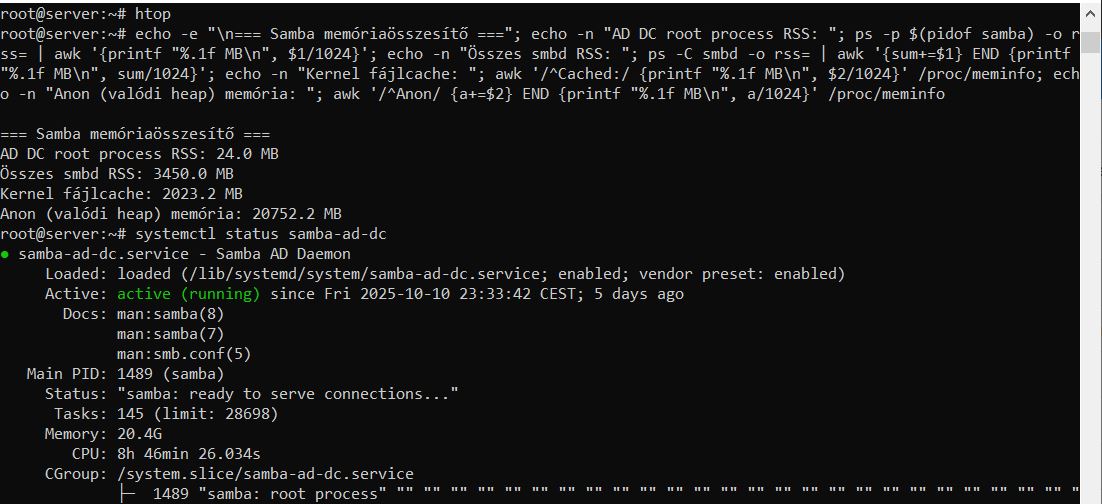
Meanwhile, I continued to monitor the samba, and I don’t think this is a real leak, because the samba processes themselves never exceed 6GB, but it stores more and more things in the cache (even going as far as swap), so it keeps growing, meaning that in theory, this memory can be freed up at any time if necessary. It’s a good question why it needs such a large cache or why it doesn’t empty itself after a while…
Yes, according to htop, smbd memory usage is also growing unchecked on our case too, but this increase comes exclusively from the samba caches; the samba processes themselves never exceed 6-7 GB (which means a maximum of 120-150 samba connections, which is completely realistic). At the end of the day, when there is no traffic, the number of samba processes drops to a few and memory consumption also drops to about 200 MB, but the cache remains, so we have this daily fluctuation of 5-7 GB, but from a consistently higher base, as the cache is constantly filling up but never gets cleared. So in this sense, we can talk about leakage, but it is much less serious than if the actual Samba process itself were to grow continuously, since the cache can in theory be deleted at any time if another process needs it.
Yes, thank you, I noticed it too and even updated it last week, but the situation remains unchanged. It seems that under Ubuntu 22.04, version 1.6 was the last bug-free version in terms of memory leaks, so if you haven’t updated yet, it’s better to stick with version 1.6.
Long time ago, I had similar problems and the combination:
Nextcloud using cronjobs, which use smbclient to mount home-dirs
Nextcloud using LDAP and „groups-in-groups“ or „groups-of-groups“
old hardware
were possible culprits for the root of the problem. I think I did not really solve it but refrained from using these „special“ LDAP-connections and massive SMBclient processes on other servers.
Hope, the update brings help for you.
BTW. out of curiosity: Are you located in Hungary? Your Screenshot has some really weird characters in your script…