!Beta-Test v7.3 - 2. Phase!

Liebe linuxmuster.net - community,

die Entwicklung der nächsten linuxmuster.net Verion v7.3 ist schon weit fortgeschritten und geht nun in die 2. Phase des Beta-Tests.

Wir bitten Euch, intensiv die Installation from scratch, die Migration, den Benutzerimport und die Umstellung der Clients auf Linbo 4.3 zu testen.

Sichert vorher alle Daten, erstellt Snapshots Eurer virtuellen Maschinen und geht bitte nach derzeitiger Dokumentation vor.

Die Doku findet Ihr unter Einführung — linuxmuster.net latest Dokumentation

!!Die derzeitige latest Dokumentation verweist noch auf die v7.2 !!

Ihr könnt oben links in der Menüleiste der Doku oder im flyout Menü die Version v7.3 auswählen.

Wir freuen uns über Eure Rückmeldungen, Verbesserungsvorschläge/Rückfragen, Fehlerberichte zu den Funktionen und auch zur Doku.

VG
von Eurem Entwickler-Team und Eurem Doku-Team

Hallo vor allem @thomas ,
ich bin ja immer mutig und habe kurzehand vorhin ein Update von 7.2 auf 7.3 in meiner Schule gemacht. Hat alles soweit perfekt geklappt und bis auf unten stehendes Problem funktioniert auf den ersten Blick alles noch.
Allerdings booten meine Clients nicht mehr durch! Das selbe Verhalten habe ich schon vor Wochen in meiner Testumgebung beobachtet.
Der Sync endet mit der Fehlermeldung: **Prozess Syncting abgestürzt**.
In den linbo.log Dateien findet sich die Fehlermeldung nicht aber im Fenster der Linbo Gui, daher hier ein Screenshot:

Wenn man im nächsten Schritt den Client manuell über die Gui neu startet, dann bootet der Rechner ins Betriessystem, man kann sich anmelden und alles funktioniert.

Ist jetzt für meine Nutzer morgen blöd aber ich werden den Murksaround kommunizieren, bis der Fehler behoben ist.

@thomas : Was läuft da schief? Hast du eine Idee? Hab ich was falsch konfiguriert?

Hier noch die linbo.log zum syncstart und danach die start.conf der Gruppe:

### 20250713-111914 init begin ###
Welcome to
 _   _____ _  _ ____  ____
| |  |_  _| \ | | _ \ / __ \
| |   | | | \| | |_) | | | |
| |   | | | . ` | _ <| | | |
| |____ _| |_| |\ | |_) | |__| |
|______|_____|_| \_|____/ \____/
LINBO 4.3.14-0: Psycho Killer  
Linux linbo 6.12.36 #1 SMP PREEMPT_DYNAMIC Mon Jul 7 00:27:21 CEST 2025 x86_64 GNU/Linux
Initializing hardware ...
Starting systemd-udevd version 255.4-1ubuntu8.6
### 20250713-111916 linbo_link_blkdev ###
/dev/sda -> /dev/disk0
/dev/sda1 -> /dev/disk0p1
/dev/sda2 -> /dev/disk0p2
/dev/sda3 -> /dev/disk0p3
netlink error: Operation not supported
udhcpc: started, v1.37.0
udhcpc: broadcasting discover
udhcpc: broadcasting select for 10.16.1.59, server 10.16.1.1
udhcpc: lease of 10.16.1.59 obtained from 10.16.1.1, lease time 172800
start.conf.noble
sent 43 bytes received 1,229 bytes 2,544.00 bytes/sec
total size is 1,130 speedup is 0.89
### 20250713-111917 linbo_split_startconf ###
### 20250713-111917 linbo_mountcache ###
Mounting cache partition /dev/sda3 ...
### 20250713-111917 linbo_mount /dev/sda3 /cache ###
### 20250713-111917 linbo_update ###
Looking for LINBO updates.
LINBO is up-to-date.
Downloading torrent-client.conf.
Downloading multicast.list.
Downloading linbo wallpaper.
Updating ipxe file.
Updating common grub configuration.
Updating host and group specific grub configuration.
Updating grub themes ... OK!
Updating linuxmuster-win ... OK!
mk_boot 
realpath: : No such file or directory
prepare_grub /cache/boot/grub /cache/boot/grub/grubenv /usr/share/grub
Providing grub environment in cache ...
 * Providing grub environment ... 
Installing GRUB in MBR/EFI of /dev/disk0 ... Installing for i386-pc platform.
Installation finished. No error reported.
OK!
Linbo & grub update successfully finished.
Requesting upload of /tmp/linbo.log ...
### 20250713-111922 linbo_mountcache ###
Copied start.conf successfully to cache.
Successfully saved hostname proxmox-01.linuxmuster.windeck-gymnasium.de to cache.
[1374] Jul 13 11:19:22 Running in background
### 20250713-111922 linbo_seed ###
Started linbo seeder for noble.qcow2.torrent.
### 20250713-111922 init end ###
e ###
### 20250713-111922 linbo_vnc ###
### 20250713-111922 linbo_gui ###
### 20250713-111922 linbo_update_gui ###
### 20250713-111922 linbo_download linbo_gui64_7.tar.lz ###
### 20250713-111923 linbo_download icons/ubuntu.png ###
[Info] Starting to parse start.conf
[Info] Finished parsing start.conf
[Info] Loading environment values
[Info] Executing: linbo_cmd ip
[Info] Executing: linbo_cmd netmask
[Info] Executing: linbo_cmd bitmask
24
[Info] Executing: linbo_cmd mac
[Info] Executing: linbo_cmd version
[Info] Executing: linbo_cmd hostname
proxmox-01
[Info] Executing: linbo_cmd cpu
Common KVM processor
[Info] Executing: linbo_cmd memory
[Info] Executing: linbo_cmd size /dev/disk0p3
21.9/33.2GB
[Info] Executing: linbo_cmd size /dev/diskp
130.0GB
[Info] Executing: linbo_cmd listimages /dev/disk0p3
### 20250713-111925 linbo_mountcache ###
noble.qcow2
[Info] Finished loading environment values
[Info] Linbo state changed to: 2
[Info] Beginning autostart timeout for Ubuntu 24.04
[Info] Executing autostart for Ubuntu 24.04
[+++ Chapter +++] Syncing Ubuntu 24.04
[Info] Linbo state changed to: 5
[Info] Executing: linbo_cmd syncstart /dev/disk0p3 noble.qcow2 /dev/disk0p1 /dev/disk0p1 /boot/vmlinuz /boot/initrd.img ro splash
[Info] Executed autostart successfully!
### 20250713-111925 linbo_syncstart /dev/disk0p3 noble.qcow2 /dev/disk0p1 /dev/disk0p1 /boot/vmlinuz /boot/initrd.img ro splash ###
### 20250713-111925 linbo_sync /dev/disk0p3 noble.qcow2 /dev/disk0p1 /dev/disk0p1 /boot/vmlinuz /boot/initrd.img ro splash ###
### 20250713-111925 linbo_download_image noble.qcow2 ###
### linbo_download_image noble.qcow2
### 20250713-111925 linbo_download images/noble/noble.qcow2.info ###
Trying to download noble.qcow2.postsync ... Trying to download noble.qcow2.postsync ... Trying to download noble.qcow2.postsync ... Trying to download noble.qcow2.postsync ...
### 20250713-111925 linbo_download images/noble/noble.qcow2.postsync ###
not available.
Trying to download noble.postsync ... not available.
Trying to download noble.postsync ...
### 20250713-111925 linbo_download images/noble/noble.postsync ###
Ok.
Trying to download noble.qcow2.reg ... Ok.
Trying to download noble.qcow2.reg ...
### 20250713-111925 linbo_download images/noble/noble.qcow2.reg ###
Trying to download noble.reg ... not available.
Trying to download noble.reg ...
### 20250713-111926 linbo_download images/noble/noble.reg ###
noble.qcow2 has not changed, nothing to do.
Torrent options: -I 10.16.1.59 -m 1 -M 100 -z 128
Starting torrent service for noble.qcow2.
### 20250713-111926 linbo_download_image noble.qdiff ###
### linbo_download_image noble.qdiff
Trying to download noble.qdiff.postsync ... Trying to download noble.qdiff.postsync ... Trying to download noble.qdiff.postsync ... Trying to download noble.qdiff.postsync ...
### 20250713-111926 linbo_download images/noble/noble.qdiff.postsync ###
### 20250713-111926 linbo_download images/noble/noble.postsync ###
Trying to download noble.qdiff.reg ... Ok.
Trying to download noble.qdiff.reg ...
### 20250713-111926 linbo_download images/noble/noble.qdiff.reg ###
### 20250713-111927 linbo_download images/noble/noble.reg ###
Trying to download noble.qdiff.desc ... Trying to download noble.qdiff.desc ... Trying to download noble.qdiff.desc ... not available.
Trying to download noble.qdiff.desc ...
### 20250713-111927 linbo_download images/noble/noble.qdiff.desc ###
Trying to download noble.qdiff.info ... not available.
Trying to download noble.qdiff.info ...
### 20250713-111927 linbo_download images/noble/noble.qdiff.info ###
### 20250713-111927 linbo_download images/noble/noble.qdiff.torrent important ###
RSYNC Download 10.16.1.1 -> images/noble/noble.qdiff.torrent ...
File images/noble/noble.qdiff.torrent could not be downloaded.
### 20250713-111927 linbo_download images/noble/noble.qdiff important ###
RSYNC Download 10.16.1.1 -> images/noble/noble.qdiff ...
File images/noble/noble.qdiff could not be downloaded.
[StdOut] Requesting upload of /tmp/linbo.log ...
syncl noble.qcow2 /dev/disk0p1
### 20250713-111928 linbo_mountcache ###
restore 1: »noble.qcow2« 2: »/dev/disk0p1«
Unpacking: noble.qcow2 -> /dev/disk0p1
## Sun Jul 13 11:19:28 CEST 2025 : Check status of /dev/disk0p1 using noble.qcow2.
### 20250713-111928 linbo_mount /dev/disk0p1 /mnt -r ###
ext4
File sync ...
## Sun Jul 13 11:19:28 CEST 2025 : Starting sync of noble.qcow2 to /dev/disk0p1.
### 20250713-111928 linbo_mount /dev/disk0p1 /mnt ###
### 20250713-111931 linbo_mount /dev/nbd0 /image -r ###
Syncing ... please wait ...
2025/07/13 11:19:31 [2205] building file list
2025/07/13 11:19:32 [2205] deleting .linbo
2025/07/13 11:19:32 [2205] deleting etc/systemd/system/graphical.target.wants/fixsssd.service
2025/07/13 11:19:35 [2205] deleting tmp/.font-unix/
2025/07/13 11:19:35 [2205] deleting tmp/.XIM-unix/
2025/07/13 11:19:35 [2205] deleting tmp/.X11-unix/
2025/07/13 11:19:35 [2205] deleting tmp/.ICE-unix/
2025/07/13 11:19:35 [2205] deleting tmp/krb5cc_0
2025/07/13 11:19:48 [2205] deleting var/cache/apparmor/0bb6850a.0/usr.sbin.rsyslogd-U4vN4X
2025/07/13 11:19:52 [2205] deleting var/lib/gdm3/.cache/ibus/dbus-EdWVG5GX
2025/07/13 11:19:52 [2205] deleting var/lib/sss/db/timestamps_linuxmuster.windeck-gymnasium.de.ldb
2025/07/13 11:19:52 [2205] deleting var/lib/sss/db/sssd.ldb
2025/07/13 11:19:52 [2205] deleting var/lib/sss/db/cache_linuxmuster.windeck-gymnasium.de.ldb
2025/07/13 11:19:52 [2205] deleting var/log/syslog.1
2025/07/13 11:19:52 [2205] deleting var/log/lastlog
2025/07/13 11:19:52 [2205] deleting var/log/kern.log.1
2025/07/13 11:19:52 [2205] deleting var/log/dpkg.log.1
2025/07/13 11:19:52 [2205] deleting var/log/dmesg.0
2025/07/13 11:19:52 [2205] deleting var/log/btmp.1
2025/07/13 11:19:52 [2205] deleting var/log/boot.log.1
2025/07/13 11:19:52 [2205] deleting var/log/auth.log.1
2025/07/13 11:19:52 [2205] deleting var/log/apport.log.1
2025/07/13 11:19:52 [2205] deleting var/log/alternatives.log.1
2025/07/13 11:19:52 [2205] deleting var/log/Xorg.0.log
2025/07/13 11:19:52 [2205] deleting var/log/apt/term.log.1.gz
2025/07/13 11:19:52 [2205] deleting var/log/apt/history.log.1.gz
2025/07/13 11:19:52 [2205] deleting var/log/journal/2a05cd74874b43ad88d9647a9924e9b2/system@f205a3303ec84071b880f7334cda6913-00000000002b0c82-0006387f10dd042a.journal
2025/07/13 11:19:52 [2205] deleting var/log/sssd/sssd_sudo.log.1
2025/07/13 11:19:52 [2205] deleting var/log/sssd/sssd_pam.log.1
2025/07/13 11:19:52 [2205] deleting var/log/sssd/sssd_pac.log.1
2025/07/13 11:19:52 [2205] deleting var/log/sssd/sssd_nss.log.1
2025/07/13 11:19:52 [2205] deleting var/log/sssd/sssd_linuxmuster.windeck-gymnasium.de.log.1
2025/07/13 11:19:52 [2205] deleting var/log/sssd/sssd.log.1
2025/07/13 11:19:52 [2205] sent 96159589 bytes received 33846 bytes total size 25782486481
/dev/nbd0 disconnected
## Sun Jul 13 11:19:54 CEST 2025 : Update status of /dev/disk0p1 using noble.qcow2.
### 20250713-111954 linbo_mount /dev/disk0p1 /mnt ###
## Sun Jul 13 11:19:54 CEST 2025 : Sync from noble.qcow2 finished.
Done.
202507131119 applied: noble.qcow2 "202506262219"
Requesting upload of /tmp/image.status ...
### 20250713-111955 linbo_mount /dev/disk0p1 /mnt ###
BIOS system found.
Setting hostname -> proxmox-01.
patch_fstab 1: »/dev/disk0p1«
/dev/nvme0n1p2 -> /dev/sda1
##### noble-linuxmuster POSTSYNC BEGIN #####
LinboServer: 10.16.1.1
Hostname: proxmox-01
Raum: proxmox
Patchcache: /linuxmuster-client/serverpatches
Patchclass: noble
- getting patchfiles
receiving incremental file list
noble/bio-01/var/lib/gdm3/.config/monitors.xml
0 0% 0.00kB/s 0:00:00 893 100% 872.07kB/s 0:00:00 (xfr#1, to-chk=215/248)
noble/bio-02/var/lib/gdm3/.config/monitors.xml
0 0% 0.00kB/s 0:00:00 904 100% 882.81kB/s 0:00:00 (xfr#2, to-chk=210/248)
noble/bk-01/var/lib/gdm3/.config/monitors.xml
0 0% 0.00kB/s 0:00:00 890 100% 869.14kB/s 0:00:00 (xfr#3, to-chk=205/248)
noble/bk-02/var/lib/gdm3/.config/monitors.xml
0 0% 0.00kB/s 0:00:00 890 100% 869.14kB/s 0:00:00 (xfr#4, to-chk=200/248)
noble/chem-01/var/lib/gdm3/.config/monitors.xml
0 0% 0.00kB/s 0:00:00 904 100% 882.81kB/s 0:00:00 (xfr#5, to-chk=195/248)
noble/chem-02/var/lib/gdm3/.config/monitors.xml
0 0% 0.00kB/s 0:00:00 904 100% 882.81kB/s 0:00:00 (xfr#6, to-chk=190/248)
noble/chem-bchs/var/lib/gdm3/.config/monitors.xml
0 0% 0.00kB/s 0:00:00 904 100% 882.81kB/s 0:00:00 (xfr#7, to-chk=185/248)
noble/chem-bcklein/var/lib/gdm3/.config/monitors.xml
0 0% 0.00kB/s 0:00:00 904 100% 882.81kB/s 0:00:00 (xfr#8, to-chk=180/248)
noble/chem-bcr/var/lib/gdm3/.config/monitors.xml
0 0% 0.00kB/s 0:00:00 904 100% 882.81kB/s 0:00:00 (xfr#9, to-chk=175/248)
noble/coa-202/etc/xdg/autostart/xrandr.desktop
0 0% 0.00kB/s 0:00:00 174 100% 169.92kB/s 0:00:00 (xfr#10, to-chk=170/248)
noble/coa-202/usr/local/bin/set_cloning_mode_dash_to_panel_top
0 0% 0.00kB/s 0:00:00 252 100% 246.09kB/s 0:00:00 (xfr#11, to-chk=167/248)
noble/coa/etc/xdg/autostart/xrandr.desktop
0 0% 0.00kB/s 0:00:00 168 100% 164.06kB/s 0:00:00 (xfr#12, to-chk=162/248)
noble/coa/usr/local/bin/set_cloning_mode_dash_to_panel_top
0 0% 0.00kB/s 0:00:00 252 100% 246.09kB/s 0:00:00 (xfr#13, to-chk=159/248)
noble/cob-202/coa-202/etc/xdg/autostart/xrandr.desktop
0 0% 0.00kB/s 0:00:00 174 100% 169.92kB/s 0:00:00 (xfr#14, to-chk=151/248)
noble/cob-202/coa-202/usr/local/bin/set_cloning_mode_dash_to_panel_top
0 0% 0.00kB/s 0:00:00 252 100% 246.09kB/s 0:00:00 (xfr#15, to-chk=148/248)
noble/cob-202/etc/xdg/autostart/xrandr.desktop
0 0% 0.00kB/s 0:00:00 167 100% 81.54kB/s 0:00:00 (xfr#16, to-chk=145/248)
noble/cob-202/usr/local/bin/set_cloning_mode_dash_to_panel_top
0 0% 0.00kB/s 0:00:00 253 100% 123.54kB/s 0:00:00 (xfr#17, to-chk=142/248)
noble/cob-206/etc/xdg/autostart/xrandr.desktop
0 0% 0.00kB/s 0:00:00 167 100% 81.54kB/s 0:00:00 (xfr#18, to-chk=137/248)
noble/cob-206/usr/local/bin/set_cloning_mode_dash_to_panel_top
0 0% 0.00kB/s 0:00:00 251 100% 122.56kB/s 0:00:00 (xfr#19, to-chk=134/248)
noble/cob/etc/xdg/autostart/xrandr.desktop
0 0% 0.00kB/s 0:00:00 168 100% 82.03kB/s 0:00:00 (xfr#20, to-chk=129/248)
noble/cob/usr/local/bin/set_cloning_mode_dash_to_panel_top
0 0% 0.00kB/s 0:00:00 253 100% 123.54kB/s 0:00:00 (xfr#21, to-chk=126/248)
noble/common/etc/fstab
0 0% 0.00kB/s 0:00:00 430 100% 209.96kB/s 0:00:00 (xfr#22, to-chk=121/248)
noble/common/etc/hosts
0 0% 0.00kB/s 0:00:00 6,243 100% 2.98MB/s 0:00:00 (xfr#23, to-chk=120/248)
noble/common/etc/x11vnc.pass
0 0% 0.00kB/s 0:00:00 8 100% 2.60kB/s 0:00:00 (xfr#24, to-chk=119/248)
noble/common/etc/cron.d/internetdaemon
0 0% 0.00kB/s 0:00:00 344 100% 111.98kB/s 0:00:00 (xfr#25, to-chk=111/248)
noble/common/etc/cron.d/linuxmuster-client
0 0% 0.00kB/s 0:00:00 483 100% 157.23kB/s 0:00:00 (xfr#26, to-chk=110/248)
noble/common/etc/cups/client.conf
0 0% 0.00kB/s 0:00:00 20 100% 6.51kB/s 0:00:00 (xfr#27, to-chk=109/248)
noble/common/etc/linuxmuster-linuxclient7/onLoginAsRoot.d/02_allow_ping.sh
0 0% 0.00kB/s 0:00:00 45 100% 14.65kB/s 0:00:00 (xfr#28, to-chk=106/248)
noble/common/etc/linuxmuster-linuxclient7/onLoginAsRoot.d/03_set_wine_defaultprofile.sh
0 0% 0.00kB/s 0:00:00 567 100% 184.57kB/s 0:00:00 (xfr#29, to-chk=105/248)
noble/common/etc/linuxmuster-linuxclient7/onSessionStarted.d/02-set-rights-homedir.sh
0 0% 0.00kB/s 0:00:00 28 100% 9.11kB/s 0:00:00 (xfr#30, to-chk=104/248)
noble/common/etc/linuxmuster-maus/sperren.sh
0 0% 0.00kB/s 0:00:00 1,309 100% 426.11kB/s 0:00:00 (xfr#31, to-chk=103/248)
noble/common/etc/linuxmuster-maus/sperren.sh.v0.7
0 0% 0.00kB/s 0:00:00 1,207 100% 392.90kB/s 0:00:00 (xfr#32, to-chk=102/248)
noble/common/etc/pam.d/common-auth
0 0% 0.00kB/s 0:00:00 1,328 100% 324.22kB/s 0:00:00 (xfr#33, to-chk=101/248)
noble/common/etc/security/group.conf
0 0% 0.00kB/s 0:00:00 3,764 100% 918.95kB/s 0:00:00 (xfr#34, to-chk=100/248)
noble/common/etc/systemd/system/x11vnc.service
0 0% 0.00kB/s 0:00:00 411 100% 100.34kB/s 0:00:00 (xfr#35, to-chk=98/248)
noble/common/home/linuxadmin/.hidden
0 0% 0.00kB/s 0:00:00 33 100% 8.06kB/s 0:00:00 (xfr#36, to-chk=96/248)
noble/common/home/linuxadmin/.config/remmina/remmina.pref
0 0% 0.00kB/s 0:00:00 2,901 100% 708.25kB/s 0:00:00 (xfr#37, to-chk=93/248)
noble/common/opt/EinTest.txt
0 100% 0.00kB/s 0:00:00 (xfr#38, to-chk=92/248)
noble/common/opt/tigerjython/bin/tigerjython2.cfg
0 0% 0.00kB/s 0:00:00 396 100% 96.68kB/s 0:00:00 (xfr#39, to-chk=89/248)
noble/common/usr/local/bin/check-shutdown
0 0% 0.00kB/s 0:00:00 1,889 100% 461.18kB/s 0:00:00 (xfr#40, to-chk=85/248)
noble/common/usr/local/bin/fix-sssd
0 0% 0.00kB/s 0:00:00 182 100% 44.43kB/s 0:00:00 (xfr#41, to-chk=84/248)
noble/common/usr/local/bin/internetdaemon.sh.deaktivated
0 0% 0.00kB/s 0:00:00 752 100% 146.88kB/s 0:00:00 (xfr#42, to-chk=83/248)
noble/common/usr/local/bin/rm-wlan-pws
0 0% 0.00kB/s 0:00:00 61 100% 11.91kB/s 0:00:00 (xfr#43, to-chk=82/248)
noble/common/usr/local/bin/startirfanview
0 0% 0.00kB/s 0:00:00 84 100% 16.41kB/s 0:00:00 (xfr#44, to-chk=81/248)
noble/common/usr/local/bin/startjavaeditor
0 0% 0.00kB/s 0:00:00 150 100% 29.30kB/s 0:00:00 (xfr#45, to-chk=80/248)
noble/common/usr/local/bin/startmaussk
0 0% 0.00kB/s 0:00:00 58 100% 11.33kB/s 0:00:00 (xfr#46, to-chk=79/248)
noble/common/usr/local/bin/tigerjython
0 0% 0.00kB/s 0:00:00 77 100% 15.04kB/s 0:00:00 (xfr#47, to-chk=78/248)
noble/common/usr/share/applications/irfanview.desktop
0 0% 0.00kB/s 0:00:00 188 100% 36.72kB/s 0:00:00 (xfr#48, to-chk=76/248)
noble/common/usr/share/applications/javaeditor.desktop
0 0% 0.00kB/s 0:00:00 186 100% 36.33kB/s 0:00:00 (xfr#49, to-chk=75/248)
noble/common/usr/share/applications/maus_sk.desktop
0 0% 0.00kB/s 0:00:00 197 100% 38.48kB/s 0:00:00 (xfr#50, to-chk=74/248)
noble/infgr-le/etc/xdg/autostart/xrandr.desktop
0 0% 0.00kB/s 0:00:00 209 100% 34.02kB/s 0:00:00 (xfr#51, to-chk=70/248)
noble/infkl-le/etc/xdg/autostart/xrandr.desktop
0 0% 0.00kB/s 0:00:00 161 100% 26.20kB/s 0:00:00 (xfr#52, to-chk=66/248)
noble/kla-106/etc/xdg/autostart/xrandr.desktop
0 0% 0.00kB/s 0:00:00 185 100% 30.11kB/s 0:00:00 (xfr#53, to-chk=61/248)
noble/kla-106/usr/local/bin/xrandr_addnewmode
0 0% 0.00kB/s 0:00:00 207 100% 33.69kB/s 0:00:00 (xfr#54, to-chk=58/248)
noble/kla-107/etc/xdg/autostart/xrandr.desktop
0 0% 0.00kB/s 0:00:00 185 100% 30.11kB/s 0:00:00 (xfr#55, to-chk=53/248)
noble/kla-107/usr/local/bin/xrandr_addnewmode
0 0% 0.00kB/s 0:00:00 207 100% 33.69kB/s 0:00:00 (xfr#56, to-chk=50/248)
noble/kla-109/etc/xdg/autostart/xrandr.desktop
0 0% 0.00kB/s 0:00:00 235 100% 38.25kB/s 0:00:00 (xfr#57, to-chk=45/248)
noble/kla-109/usr/local/bin/set_dash_to_panel_top
0 0% 0.00kB/s 0:00:00 249 100% 40.53kB/s 0:00:00 (xfr#58, to-chk=42/248)
noble/musik-01/etc/xdg/autostart/xrandr.desktop
0 0% 0.00kB/s 0:00:00 156 100% 21.76kB/s 0:00:00 (xfr#59, to-chk=38/248)
noble/musik-02/etc/xdg/autostart/xrandr.desktop
0 0% 0.00kB/s 0:00:00 156 100% 21.76kB/s 0:00:00 (xfr#60, to-chk=34/248)
noble/nbmi/etc/linuxmuster-linuxclient7/onBoot.d/10_enable_wifi.sh
0 0% 0.00kB/s 0:00:00 215 100% 29.99kB/s 0:00:00 (xfr#61, to-chk=27/248)
noble/nbmi/etc/linuxmuster-linuxclient7/onBoot.d/20_connect_wifi.sh
0 0% 0.00kB/s 0:00:00 604 100% 84.26kB/s 0:00:00 (xfr#62, to-chk=26/248)
noble/nbmi/etc/netplan.warmaleinversuchwaraberscheisse/90-NM-bc50c29f-7d65-43da-b8b2-862551cbd342.yaml
0 0% 0.00kB/s 0:00:00 699 100% 97.52kB/s 0:00:00 (xfr#63, to-chk=25/248)
noble/nbmi/etc/systemd/system/fixsssd.service
0 0% 0.00kB/s 0:00:00 262 100% 36.55kB/s 0:00:00 (xfr#64, to-chk=23/248)
noble/nbmi/usr/local/bin/cw_pskpw
0 0% 0.00kB/s 0:00:00 13 100% 1.81kB/s 0:00:00 (xfr#65, to-chk=20/248)
noble/nbmi/usr/local/bin/cw_ssid
0 0% 0.00kB/s 0:00:00 25 100% 3.49kB/s 0:00:00 (xfr#66, to-chk=19/248)
noble/ph-01/var/lib/gdm3/.config/monitors.xml
0 0% 0.00kB/s 0:00:00 904 100% 110.35kB/s 0:00:00 (xfr#67, to-chk=14/248)
noble/ph-02/var/lib/gdm3/.config/monitors.xml
0 0% 0.00kB/s 0:00:00 904 100% 110.35kB/s 0:00:00 (xfr#68, to-chk=9/248)
noble/ph-03/var/lib/gdm3/.config/monitors.xml
0 0% 0.00kB/s 0:00:00 904 100% 110.35kB/s 0:00:00 (xfr#69, to-chk=4/248)
noble/rm-le/etc/xdg/autostart/xrandr.desktop
0 0% 0.00kB/s 0:00:00 197 100% 24.05kB/s 0:00:00 (xfr#70, to-chk=0/248)
- patching local files
=====SYNC CUSTOM CONFIG=====
BEGIN...
cp: can't stat '/mnt/var/lib/gdm3/.config/monitors.xml': No such file or directory
removed '/mnt/home/linuxadmin/Downloads/Oracle_VirtualBox_Extension_Pack-7.1.10.vbox-extpack'
chmod: /mnt/usr/local/bin/cw_pskpw: No such file or directory
chmod: /mnt/usr/local/bin/cw_ssid: No such file or directory
##### POSTSYNC END #####
mk_boot
realpath: : No such file or directory
prepare_grub /cache/boot/grub /cache/boot/grub/grubenv /usr/share/grub
### 20250713-111956 linbo_label all ###
linbo_label all
Partition /dev/disk0p1 - fstype ext4 --> label ubuntu ... OK!
Setting up swapspace version 1, size = 17179865088 bytes
UUID=c4cc75a9-0060-49ff-820c-3a6c7e6ebb9b
Partition /dev/disk0p2 - fstype swap --> label swap ... OK!
Partition /dev/disk0p3 - fstype ext4 --> label cache ... OK!
[StdOut] Requesting upload of /tmp/linbo.log ...

Start conf:

[LINBO]
Group = noble
Cache = /dev/disk0p3
RootTimeout = 600
AutoPartition = no
AutoFormat = no
AutoInitCache = no
DownloadType = torrent
GuiDisabled = no
UseMinimalLayout = no
ClientDetailsVisibleByDefault = yes
Locale = de-DE
BackgroundColor = 394f5e
BackgroundFontColor = white
ConsoleFontColorStdout = lightgreen
ConsoleFontColorStderr = orange
#SystemType = bios
KernelOptions = quiet splash dhcpretry=20 nomodeset nowarmstart loadmodules=r8168 modprobe.blacklist=r8169

[Partition]
Dev = /dev/disk0p1
Label = ubuntu
Size = 80G
Id = 83
FSType = ext4
Bootable = yes

[Partition]
Dev = /dev/disk0p2
Label = swap
Size = 16G
Id = 82
FSType = swap
Bootable = no

[Partition]
Dev = /dev/disk0p3
Label = cache
Size = 
Id = 83
FSType = ext4
Bootable = yes

[OS]
Name = Ubuntu 24.04
Description = Ubuntu 24.04 Noble Numbat
IconName = ubuntu.png
BaseImage = noble.qcow2
Boot = /dev/disk0p1
Root = /dev/disk0p1
Kernel = /boot/vmlinuz
Initrd = /boot/initrd.img
Append = ro splash
StartEnabled = no
SyncEnabled = yes
NewEnabled = no
Autostart = yes
AutostartTimeout = 0
DefaultAction = sync

VG
Dominik

Hallo Dominik,

so hab ich das in meiner virtuellen Umgebung auchschon beobachtet: der sync läuft durch, auch das „nextboot“ ist gesetzt, aber der reboot wird nicht ausgeführt. Macht man ihn „von Hand“ dann bootet das anscheinend korrekt zuende gesyncte BS.
Die wichtige Frage wäre ja: wie läuft der sync danach? Passiert das also nur beim ersten sync nach upgrade von linbo 4.2 auf 4.3?
Das wäre zwar unschön, aber nicht so schlimm.
Bei mir war es nicht so: auch weitere syncs (rot oder gelb) zeigten das Verhalten.
Auch ein frisch Partitionieren des Clients schuf da keine Abhilfe.
Es waren Windows und debian auf dem Client betroffen.

LG
Holger

Hallo Holger,

leider ist das Verhalten dauerhaft, d.h. nach jedem Sync bleiben die Clients hängen und beim nächsten Boot starten sie in Betriebssystem. Ich habe alle nur erdenklichen Dinge versucht aber das Verhalten bleibt.

Ich denke da kann nur Thomas helfen.

LG

Dominik

Hallo wahrscheinlich @Arnaud,

ich bekomme seit dem Upgrade auf 7.3 alle paar Stunden eine Warnungsmail mit folgendem Inhalt:

WARNING: Using passwords on command line is insecure. Installing the setproctitle python module will hide these from shortly after program start.

Die Warnung kommt von folgendem cronjob:

/usr/sbin/sophomorix-managementgroup --set-internet default

Mit dem cronjob entferne ich in den Pausen die Internetsperre für alle, da die Kollegen das gerne vergessen…
Bisher lief das ohne Fehlermeldung. Was muss ich tun / soll ich was tun?

VG

Dominik

Ich antworte mir mal selber,
nachdem ich das Paket: python3-setproctitle auf dem Server installiert habe ist die Warnungsmeldung verschwunden. @thomas oder @Arnaud: eventuell sollte dieses Paket als Abhängigkeit bei der Installation / beim Upgrade mitkommen?
VG
Dominik

Hallo nochmal @thomas .
Noch ein Update zu dem linbo-boot Problem.
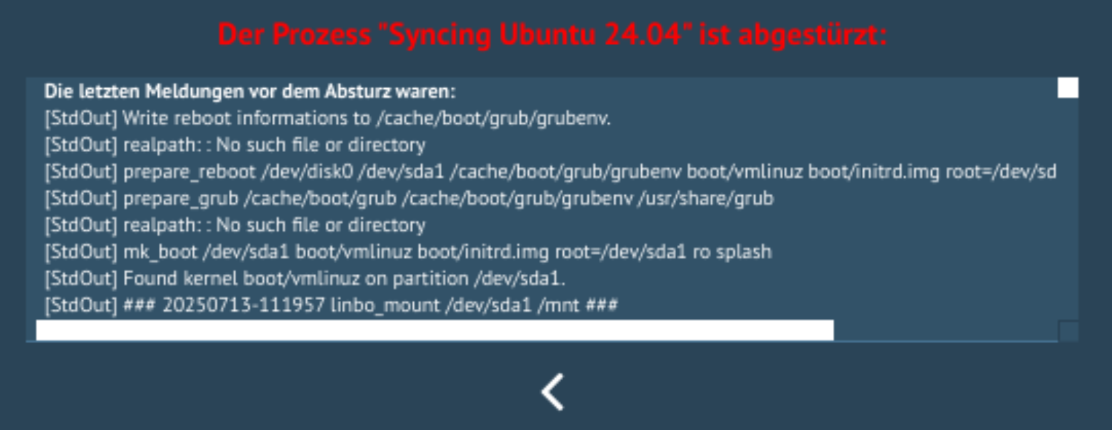
Wenn ich auf der linbo-konsole den Sync mit linbo_wrapper sync:1 starte gibt es gar keine Fehlermeldung, der Sync läuft durch.
Ein linbo_wrapper start:1 spuckt dann folgende Meldung aus:

### 20250713-211638 linbo_wrapper start:1 ###
Command     : start
OS number   : 1
Starting Ubuntu 24.04 ...
### 20250713-211638 linbo_start 1 ###
### 20250713-211638 linbo_mount /dev/sda1 /mnt ###
ext4
Found kernel boot/vmlinuz on partition /dev/sda1.
### 20250713-211638 linbo_mountcache ###
mk_boot /dev/sda1 boot/vmlinuz boot/initrd.img root=/dev/sda1 ro splash
realpath: : No such file or directory
prepare_grub /cache/boot/grub /cache/boot/grub/grubenv /usr/share/grub
prepare_reboot /dev/disk0 /dev/sda1 /cache/boot/grub/grubenv boot/vmlinuz boot/initrd.img root=/dev/sda1 ro splash 
realpath: : No such file or directory
Write reboot informations to /cache/boot/grub/grubenv.

Danach bleibt der Client einfach stehen und macht keinen reboot.

Und noch ein Update: Wenn ich den Kernelparameter nowarmstart entferne, dann funktioniert es, dass der Client weiter bootet. Leider bleibt der dann irgendwo beim Ubuntuboot hängen, weswegen ich den Paramter bei meinen Clients eben brauche, aber prinzipiell liegt es also nicht am Sync sondern einfach daran, dass mit dem Parameter nowarmstart kein reboot stattfindet.

VG
Dominik

Hey Dominik,

versuch doch mal in der start.conf von /dev/deindevdevice
auf
/dev/disk0p?

um zu stellen.

LG
Holger

Hi Holger,

hab ich schon…siehe meine start.conf oben. Macht keinen Unterschied was da steht. Mittlerweile bin ich soweit, dass ich glaube, dass eigentlich gar nichts essenzielles schief geht sondern einfach nur der reboot Befehl fehlt, wenn die Option nowarmstart gesetzt ist…siehe mein letzter Post. Diese Fehler mit realpath: : No such file or directory spielen glaube ich gar keine Rolle.

LG

Dominik

Guten Morgen,

noch eine Beobachtung: einige Hardware bootet nach dem Syncting-Fehler nur dann nach einem Neustart ins Betriebssystem, wenn im UEFI als erstes von der Platte gebootet wird. Wenn der erste Eintrag ein PXE-Boot ist, dann wird wieder synchronisiert, d.h. man landet in einem Loop und das Betriebssystem wird nie gestartet. Andere Rechnerhardware bootet nach einem Neustart problemlos ins Betriebssystem auch wenn der erste Eintrag PXE-Boot ist. Insgesamt ein sehr schwieriges und uneinheitliches Verhalten des neuen Linbo. Mit 4.2 lief das überall auf jeder Hardware in allen Varianten der Bootreihenfolge ohne Probleme.

VG
Dominik

Hallo Dominik,

Nur wenn es kein efi system ist, dann wird an realpath eine leere Variable übergeben mit entsprechender Meldung, was aber keine Auswirkung auf den weiteren Ablauf des Skripts hat.
Ist das ein efi oder bios Rechner?

Ich debugge das mal im Laufe des Tages.

VG, Thomas

Hallo @thomas

Der Rechner mit dieser Fehlermeldung ist ein Bios-Rechner, in sofern passt das! Bei meinen UEFI-Rechnern ist diese Meldung nicht zu sehen!

Allerdings ist das beschriebene Verhalten, dass die Rechner mit der Kerneloption nowarmstart nach dem Sync stehen bleiben auch völlig unabhängig vom Typ (Bios / UEFI). Das Betrifft hier alle 400 Rechner und die sind völlig heterogen. Das passiert im übrigen auch in meiner virtuellen Testumgebung…also ein konsistentes Missverhalten :wink:.

Hier mal der log eines EFI-Clients nach dem Sync+Start, nachdem er mit dem Fehler „Prozess Syncting ist abgestürzt“ stehen bleibt. Das passiert aber auch mit Neu+Start und auch nachdem der Client völlig platt gemacht und neu aufgesetzt wurde…habe alles versucht…das Bild ist immer gleich:

### 20250714-111457 init begin ###
Welcome to
 _   _____ _  _ ____  ____
| |  |_  _| \ | | _ \ / __ \
| |   | | | \| | |_) | | | |
| |   | | | . ` | _ <| | | |
| |____ _| |_| |\ | |_) | |__| |
|______|_____|_| \_|____/ \____/
LINBO 4.3.14-0: Psycho Killer  
Linux linbo 6.12.36 #1 SMP PREEMPT_DYNAMIC Mon Jul 7 00:27:21 CEST 2025 x86_64 GNU/Linux
Initializing hardware ...
Starting systemd-udevd version 255.4-1ubuntu8.6
### 20250714-111458 linbo_link_blkdev ###
/dev/nvme0n1 -> /dev/disk0
/dev/nvme0n1p1 -> /dev/disk0p1
/dev/nvme0n1p2 -> /dev/disk0p2
/dev/nvme0n1p3 -> /dev/disk0p3
/dev/nvme0n1p4 -> /dev/disk0p4
udhcpc: started, v1.37.0
udhcpc: broadcasting discover
udhcpc: broadcasting select for 10.16.1.50, server 10.16.1.1
udhcpc: lease of 10.16.1.50 obtained from 10.16.1.1, lease time 172800
start.conf.noble-nvmeuefi
sent 43 bytes received 1,374 bytes 2,834.00 bytes/sec
total size is 1,267 speedup is 0.89
### 20250714-111506 linbo_split_startconf ###
### 20250714-111506 linbo_mountcache ###
Mounting cache partition /dev/nvme0n1p4 ...
### 20250714-111506 linbo_mount /dev/nvme0n1p4 /cache ###
### 20250714-111506 linbo_update ###
Looking for LINBO updates.
LINBO is up-to-date.
Downloading torrent-client.conf.
Downloading multicast.list.
Downloading linbo wallpaper.
Updating ipxe file.
Updating common grub configuration.
Updating host and group specific grub configuration.
Updating grub themes ... OK!
Updating linuxmuster-win ... OK!
mk_boot 
prepare_grub /cache/boot/grub /cache/boot/grub/grubenv /usr/share/grub
Providing grub environment in cache ...
 * Providing grub environment ... 
Installing GRUB in MBR/EFI of /dev/disk0 ... Installing for x86_64-efi platform.
Installation finished. No error reported.
OK!
BootCurrent: 0003
Timeout: 0 seconds
BootOrder: 0000,0003
Boot0000* grub	HD(1,GPT,2c08f0ea-a6d2-4b1b-9c15-d6006ef0cd6f,0x800,0x100000)/File(\EFI\GRUB\GRUBX64.EFI)
Boot0001* UEFI OS	HD(1,GPT,61d97585-3738-4b8b-bb99-511c96f0089b,0x800,0x100000)/File(\EFI\BOOT\BOOTX64.EFI)
Boot0002* debian	HD(1,GPT,61d97585-3738-4b8b-bb99-511c96f0089b,0x800,0x100000)/File(\EFI\DEBIAN\GRUBX64.EFI)
Boot0003* UEFI: IPv4 Realtek PCIe GBE Family Controller	PciRoot(0x0)/Pci(0x1c,0x0)/Pci(0x0,0x0)/MAC(7c57583d2ae3,0)/IPv4(0.0.0.00.0.0.0,0,0)0000424f
Boot0004* UEFI OS	HD(1,GPT,2c08f0ea-a6d2-4b1b-9c15-d6006ef0cd6f,0x800,0x100000)/File(\EFI\BOOT\BOOTX64.EFI)
EFI bootorder has been successfully set.
Linbo & grub update successfully finished.
Requesting upload of /tmp/linbo.log ...
### 20250714-111509 linbo_mountcache ###
Copied start.conf successfully to cache.
Successfully saved hostname hp-client-test.linuxmuster.windeck-gymnasium.de to cache.
[1466] Jul 14 11:15:09 Running in background
### 20250714-111509 linbo_seed ###
Started linbo seeder for noble.qcow2.torrent.
### 20250714-111510 init end ###
e ###
### 20250714-111510 linbo_mountcache ###
### 20250714-111510 linbo_vnc ###
### 20250714-111510 linbo_gui ###
### 20250714-111510 linbo_update_gui ###
### 20250714-111510 linbo_download linbo_gui64_7.tar.lz ###
### 20250714-111510 linbo_download icons/ubuntu.png ###
[Info] Starting to parse start.conf
[Info] Finished parsing start.conf
[Info] Loading environment values
[Info] Executing: linbo_cmd ip
[Info] Executing: linbo_cmd netmask
[Info] Executing: linbo_cmd bitmask
24
[Info] Executing: linbo_cmd mac
[Info] Executing: linbo_cmd version
[Info] Executing: linbo_cmd hostname
hp-client-test
[Info] Executing: linbo_cmd cpu
12th Gen Intel(R) Core(TM) i5-12400
[Info] Executing: linbo_cmd memory
[Info] Executing: linbo_cmd size /dev/disk0p4
122.0/138.7GB
[Info] Executing: linbo_cmd size /dev/diskp
238.5GB
[Info] Executing: linbo_cmd listimages /dev/disk0p4
### 20250714-111512 linbo_mountcache ###
noble.qcow2
[Info] Finished loading environment values
[Info] Linbo state changed to: 2
[Info] Beginning autostart timeout for Ubuntu 24.04 Noble Numbat UEFI
[Info] Executing autostart for Ubuntu 24.04 Noble Numbat UEFI
[+++ Chapter +++] Syncing Ubuntu 24.04 Noble Numbat UEFI
[Info] Linbo state changed to: 5
[Info] Executing: linbo_cmd syncstart /dev/disk0p4 noble.qcow2 /dev/disk0p2 /dev/disk0p2 /boot/vmlinuz /boot/initrd.img ro quiet splash
[Info] Executed autostart successfully!
### 20250714-111512 linbo_syncstart /dev/disk0p4 noble.qcow2 /dev/disk0p2 /dev/disk0p2 /boot/vmlinuz /boot/initrd.img ro quiet splash ###
### 20250714-111512 linbo_sync /dev/disk0p4 noble.qcow2 /dev/disk0p2 /dev/disk0p2 /boot/vmlinuz /boot/initrd.img ro quiet splash ###
### 20250714-111512 linbo_download_image noble.qcow2 ###
### linbo_download_image noble.qcow2
### 20250714-111512 linbo_download images/noble/noble.qcow2.info ###
Trying to download noble.qcow2.postsync ... Trying to download noble.qcow2.postsync ... Trying to download noble.qcow2.postsync ... Trying to download noble.qcow2.postsync ...
### 20250714-111512 linbo_download images/noble/noble.qcow2.postsync ###
not available.
Trying to download noble.postsync ... not available.
Trying to download noble.postsync ...
### 20250714-111512 linbo_download images/noble/noble.postsync ###
Ok.
Trying to download noble.qcow2.reg ... Ok.
Trying to download noble.qcow2.reg ...
### 20250714-111512 linbo_download images/noble/noble.qcow2.reg ###
Trying to download noble.reg ... not available.
Trying to download noble.reg ...
### 20250714-111513 linbo_download images/noble/noble.reg ###
noble.qcow2 has not changed, nothing to do.
Torrent options: -I 10.16.1.50 -m 1 -M 100 -z 128
Starting torrent service for noble.qcow2.
### 20250714-111513 linbo_download_image noble.qdiff ###
### linbo_download_image noble.qdiff
Trying to download noble.qdiff.postsync ... Trying to download noble.qdiff.postsync ... Trying to download noble.qdiff.postsync ... Trying to download noble.qdiff.postsync ...
### 20250714-111513 linbo_download images/noble/noble.qdiff.postsync ###
### 20250714-111513 linbo_download images/noble/noble.postsync ###
Trying to download noble.qdiff.reg ... Ok.
Trying to download noble.qdiff.reg ...
### 20250714-111513 linbo_download images/noble/noble.qdiff.reg ###
Trying to download noble.qdiff.desc ... Trying to download noble.qdiff.desc ... Trying to download noble.qdiff.desc ... not available.
Trying to download noble.qdiff.desc ...
### 20250714-111514 linbo_download images/noble/noble.qdiff.desc ###
Trying to download noble.qdiff.info ... not available.
Trying to download noble.qdiff.info ...
### 20250714-111514 linbo_download images/noble/noble.qdiff.info ###
### 20250714-111514 linbo_download images/noble/noble.qdiff.torrent important ###
RSYNC Download 10.16.1.1 -> images/noble/noble.qdiff.torrent ...
File images/noble/noble.qdiff.torrent could not be downloaded.
### 20250714-111514 linbo_download images/noble/noble.qdiff important ###
RSYNC Download 10.16.1.1 -> images/noble/noble.qdiff ...
File images/noble/noble.qdiff could not be downloaded.
[StdOut] Requesting upload of /tmp/linbo.log ...
syncl noble.qcow2 /dev/disk0p2
### 20250714-111515 linbo_mountcache ###
restore 1: »noble.qcow2« 2: »/dev/disk0p2«
Unpacking: noble.qcow2 -> /dev/disk0p2
## Mon Jul 14 11:15:15 CEST 2025 : Check status of /dev/disk0p2 using noble.qcow2.
### 20250714-111515 linbo_mount /dev/disk0p2 /mnt -r ###
ext4
File sync ...
## Mon Jul 14 11:15:15 CEST 2025 : Starting sync of noble.qcow2 to /dev/disk0p2.
### 20250714-111515 linbo_mount /dev/disk0p2 /mnt ###
### 20250714-111518 linbo_mount /dev/nbd0 /image -r ###
Syncing ... please wait ...
2025/07/14 11:15:18 [2301] building file list
2025/07/14 11:15:18 [2301] deleting .linbo
2025/07/14 11:15:18 [2301] deleting etc/systemd/system/graphical.target.wants/fixsssd.service
2025/07/14 11:15:19 [2301] deleting tmp/.font-unix/
2025/07/14 11:15:19 [2301] deleting tmp/.XIM-unix/
2025/07/14 11:15:19 [2301] deleting tmp/.X11-unix/
2025/07/14 11:15:19 [2301] deleting tmp/.ICE-unix/
2025/07/14 11:15:19 [2301] deleting tmp/krb5cc_0
2025/07/14 11:15:24 [2301] deleting var/lib/NetworkManager/internal-780165aa-7d13-3913-a312-7bf621259bd5-enp1s0.lease
2025/07/14 11:15:24 [2301] deleting var/lib/bluetooth/BC:F4:D4:6F:50:56/settings
2025/07/14 11:15:24 [2301] deleting var/lib/bluetooth/BC:F4:D4:6F:50:56/
2025/07/14 11:15:26 [2301] deleting var/lib/gdm3/.cache/ibus/dbus-9BdmcWoD
2025/07/14 11:15:26 [2301] deleting var/lib/sss/db/timestamps_linuxmuster.windeck-gymnasium.de.ldb
2025/07/14 11:15:26 [2301] deleting var/lib/sss/db/sssd.ldb
2025/07/14 11:15:26 [2301] deleting var/lib/sss/db/cache_linuxmuster.windeck-gymnasium.de.ldb
2025/07/14 11:15:26 [2301] deleting var/log/syslog.1
2025/07/14 11:15:26 [2301] deleting var/log/lastlog
2025/07/14 11:15:26 [2301] deleting var/log/kern.log.1
2025/07/14 11:15:26 [2301] deleting var/log/dpkg.log.1
2025/07/14 11:15:26 [2301] deleting var/log/dmesg.0
2025/07/14 11:15:26 [2301] deleting var/log/btmp.1
2025/07/14 11:15:26 [2301] deleting var/log/boot.log.1
2025/07/14 11:15:26 [2301] deleting var/log/auth.log.1
2025/07/14 11:15:26 [2301] deleting var/log/apport.log.1
2025/07/14 11:15:26 [2301] deleting var/log/alternatives.log.1
2025/07/14 11:15:26 [2301] deleting var/log/apt/term.log.1.gz
2025/07/14 11:15:26 [2301] deleting var/log/apt/history.log.1.gz
2025/07/14 11:15:26 [2301] deleting var/log/journal/2a05cd74874b43ad88d9647a9924e9b2/system@f205a3303ec84071b880f7334cda6913-00000000002b0c82-0006387f10dd042a.journal
2025/07/14 11:15:26 [2301] deleting var/log/sssd/sssd_sudo.log.1
2025/07/14 11:15:26 [2301] deleting var/log/sssd/sssd_pam.log.1
2025/07/14 11:15:26 [2301] deleting var/log/sssd/sssd_pac.log.1
2025/07/14 11:15:26 [2301] deleting var/log/sssd/sssd_nss.log.1
2025/07/14 11:15:26 [2301] deleting var/log/sssd/sssd_linuxmuster.windeck-gymnasium.de.log.1
2025/07/14 11:15:26 [2301] deleting var/log/sssd/sssd.log.1
2025/07/14 11:15:26 [2301] sent 91600407 bytes received 33965 bytes total size 25782486481
/dev/nbd0 disconnected
## Mon Jul 14 11:15:27 CEST 2025 : Update status of /dev/disk0p2 using noble.qcow2.
### 20250714-111527 linbo_mount /dev/disk0p2 /mnt ###
## Mon Jul 14 11:15:27 CEST 2025 : Sync from noble.qcow2 finished.
Done.
202507141115 applied: noble.qcow2 "202506262219"
Requesting upload of /tmp/image.status ...
UEFI system found.
Setting hostname -> hp-client-test.
patch_fstab 1: »/dev/disk0p2«
##### noble-linuxmuster POSTSYNC BEGIN #####
LinboServer: 10.16.1.1
Hostname: hp-client-test
Raum: hp
Patchcache: /linuxmuster-client/serverpatches
Patchclass: noble
- getting patchfiles
receiving incremental file list
noble/bio-01/var/lib/gdm3/.config/monitors.xml
0 0% 0.00kB/s 0:00:00 893 100% 872.07kB/s 0:00:00 (xfr#1, to-chk=215/248)
noble/bio-02/var/lib/gdm3/.config/monitors.xml
0 0% 0.00kB/s 0:00:00 904 100% 882.81kB/s 0:00:00 (xfr#2, to-chk=210/248)
noble/bk-01/var/lib/gdm3/.config/monitors.xml
0 0% 0.00kB/s 0:00:00 890 100% 869.14kB/s 0:00:00 (xfr#3, to-chk=205/248)
noble/bk-02/var/lib/gdm3/.config/monitors.xml
0 0% 0.00kB/s 0:00:00 890 100% 869.14kB/s 0:00:00 (xfr#4, to-chk=200/248)
noble/chem-01/var/lib/gdm3/.config/monitors.xml
0 0% 0.00kB/s 0:00:00 904 100% 882.81kB/s 0:00:00 (xfr#5, to-chk=195/248)
noble/chem-02/var/lib/gdm3/.config/monitors.xml
0 0% 0.00kB/s 0:00:00 904 100% 882.81kB/s 0:00:00 (xfr#6, to-chk=190/248)
noble/chem-bchs/var/lib/gdm3/.config/monitors.xml
0 0% 0.00kB/s 0:00:00 904 100% 882.81kB/s 0:00:00 (xfr#7, to-chk=185/248)
noble/chem-bcklein/var/lib/gdm3/.config/monitors.xml
0 0% 0.00kB/s 0:00:00 904 100% 882.81kB/s 0:00:00 (xfr#8, to-chk=180/248)
noble/chem-bcr/var/lib/gdm3/.config/monitors.xml
0 0% 0.00kB/s 0:00:00 904 100% 882.81kB/s 0:00:00 (xfr#9, to-chk=175/248)
noble/coa-202/etc/xdg/autostart/xrandr.desktop
0 0% 0.00kB/s 0:00:00 174 100% 169.92kB/s 0:00:00 (xfr#10, to-chk=170/248)
noble/coa-202/usr/local/bin/set_cloning_mode_dash_to_panel_top
0 0% 0.00kB/s 0:00:00 252 100% 246.09kB/s 0:00:00 (xfr#11, to-chk=167/248)
noble/coa/etc/xdg/autostart/xrandr.desktop
0 0% 0.00kB/s 0:00:00 168 100% 164.06kB/s 0:00:00 (xfr#12, to-chk=162/248)
noble/coa/usr/local/bin/set_cloning_mode_dash_to_panel_top
0 0% 0.00kB/s 0:00:00 252 100% 246.09kB/s 0:00:00 (xfr#13, to-chk=159/248)
noble/cob-202/coa-202/etc/xdg/autostart/xrandr.desktop
0 0% 0.00kB/s 0:00:00 174 100% 169.92kB/s 0:00:00 (xfr#14, to-chk=151/248)
noble/cob-202/coa-202/usr/local/bin/set_cloning_mode_dash_to_panel_top
0 0% 0.00kB/s 0:00:00 252 100% 246.09kB/s 0:00:00 (xfr#15, to-chk=148/248)
noble/cob-202/etc/xdg/autostart/xrandr.desktop
0 0% 0.00kB/s 0:00:00 167 100% 163.09kB/s 0:00:00 (xfr#16, to-chk=145/248)
noble/cob-202/usr/local/bin/set_cloning_mode_dash_to_panel_top
0 0% 0.00kB/s 0:00:00 253 100% 247.07kB/s 0:00:00 (xfr#17, to-chk=142/248)
noble/cob-206/etc/xdg/autostart/xrandr.desktop
0 0% 0.00kB/s 0:00:00 167 100% 163.09kB/s 0:00:00 (xfr#18, to-chk=137/248)
noble/cob-206/usr/local/bin/set_cloning_mode_dash_to_panel_top
0 0% 0.00kB/s 0:00:00 251 100% 245.12kB/s 0:00:00 (xfr#19, to-chk=134/248)
noble/cob/etc/xdg/autostart/xrandr.desktop
0 0% 0.00kB/s 0:00:00 168 100% 164.06kB/s 0:00:00 (xfr#20, to-chk=129/248)
noble/cob/usr/local/bin/set_cloning_mode_dash_to_panel_top
0 0% 0.00kB/s 0:00:00 253 100% 247.07kB/s 0:00:00 (xfr#21, to-chk=126/248)
noble/common/etc/fstab
0 0% 0.00kB/s 0:00:00 430 100% 419.92kB/s 0:00:00 (xfr#22, to-chk=121/248)
noble/common/etc/hosts
0 0% 0.00kB/s 0:00:00 6,243 100% 5.95MB/s 0:00:00 (xfr#23, to-chk=120/248)
noble/common/etc/x11vnc.pass
0 0% 0.00kB/s 0:00:00 8 100% 7.81kB/s 0:00:00 (xfr#24, to-chk=119/248)
noble/common/etc/cron.d/internetdaemon
0 0% 0.00kB/s 0:00:00 344 100% 335.94kB/s 0:00:00 (xfr#25, to-chk=111/248)
noble/common/etc/cron.d/linuxmuster-client
0 0% 0.00kB/s 0:00:00 483 100% 471.68kB/s 0:00:00 (xfr#26, to-chk=110/248)
noble/common/etc/cups/client.conf
0 0% 0.00kB/s 0:00:00 20 100% 19.53kB/s 0:00:00 (xfr#27, to-chk=109/248)
noble/common/etc/linuxmuster-linuxclient7/onLoginAsRoot.d/02_allow_ping.sh
0 0% 0.00kB/s 0:00:00 45 100% 43.95kB/s 0:00:00 (xfr#28, to-chk=106/248)
noble/common/etc/linuxmuster-linuxclient7/onLoginAsRoot.d/03_set_wine_defaultprofile.sh
0 0% 0.00kB/s 0:00:00 567 100% 553.71kB/s 0:00:00 (xfr#29, to-chk=105/248)
noble/common/etc/linuxmuster-linuxclient7/onSessionStarted.d/02-set-rights-homedir.sh
0 0% 0.00kB/s 0:00:00 28 100% 27.34kB/s 0:00:00 (xfr#30, to-chk=104/248)
noble/common/etc/linuxmuster-maus/sperren.sh
0 0% 0.00kB/s 0:00:00 1,309 100% 1.25MB/s 0:00:00 (xfr#31, to-chk=103/248)
noble/common/etc/linuxmuster-maus/sperren.sh.v0.7
0 0% 0.00kB/s 0:00:00 1,207 100% 1.15MB/s 0:00:00 (xfr#32, to-chk=102/248)
noble/common/etc/pam.d/common-auth
0 0% 0.00kB/s 0:00:00 1,328 100% 1.27MB/s 0:00:00 (xfr#33, to-chk=101/248)
noble/common/etc/security/group.conf
0 0% 0.00kB/s 0:00:00 3,764 100% 3.59MB/s 0:00:00 (xfr#34, to-chk=100/248)
noble/common/etc/systemd/system/x11vnc.service
0 0% 0.00kB/s 0:00:00 411 100% 401.37kB/s 0:00:00 (xfr#35, to-chk=98/248)
noble/common/home/linuxadmin/.hidden
0 0% 0.00kB/s 0:00:00 33 100% 32.23kB/s 0:00:00 (xfr#36, to-chk=96/248)
noble/common/home/linuxadmin/.config/remmina/remmina.pref
0 0% 0.00kB/s 0:00:00 2,901 100% 2.77MB/s 0:00:00 (xfr#37, to-chk=93/248)
noble/common/opt/EinTest.txt
0 100% 0.00kB/s 0:00:00 (xfr#38, to-chk=92/248)
noble/common/opt/tigerjython/bin/tigerjython2.cfg
0 0% 0.00kB/s 0:00:00 396 100% 386.72kB/s 0:00:00 (xfr#39, to-chk=89/248)
noble/common/usr/local/bin/check-shutdown
0 0% 0.00kB/s 0:00:00 1,889 100% 1.80MB/s 0:00:00 (xfr#40, to-chk=85/248)
noble/common/usr/local/bin/fix-sssd
0 0% 0.00kB/s 0:00:00 182 100% 177.73kB/s 0:00:00 (xfr#41, to-chk=84/248)
noble/common/usr/local/bin/internetdaemon.sh.deaktivated
0 0% 0.00kB/s 0:00:00 752 100% 734.38kB/s 0:00:00 (xfr#42, to-chk=83/248)
noble/common/usr/local/bin/rm-wlan-pws
0 0% 0.00kB/s 0:00:00 61 100% 59.57kB/s 0:00:00 (xfr#43, to-chk=82/248)
noble/common/usr/local/bin/startirfanview
0 0% 0.00kB/s 0:00:00 84 100% 82.03kB/s 0:00:00 (xfr#44, to-chk=81/248)
noble/common/usr/local/bin/startjavaeditor
0 0% 0.00kB/s 0:00:00 150 100% 146.48kB/s 0:00:00 (xfr#45, to-chk=80/248)
noble/common/usr/local/bin/startmaussk
0 0% 0.00kB/s 0:00:00 58 100% 56.64kB/s 0:00:00 (xfr#46, to-chk=79/248)
noble/common/usr/local/bin/tigerjython
0 0% 0.00kB/s 0:00:00 77 100% 75.20kB/s 0:00:00 (xfr#47, to-chk=78/248)
noble/common/usr/share/applications/irfanview.desktop
0 0% 0.00kB/s 0:00:00 188 100% 183.59kB/s 0:00:00 (xfr#48, to-chk=76/248)
noble/common/usr/share/applications/javaeditor.desktop
0 0% 0.00kB/s 0:00:00 186 100% 181.64kB/s 0:00:00 (xfr#49, to-chk=75/248)
noble/common/usr/share/applications/maus_sk.desktop
0 0% 0.00kB/s 0:00:00 197 100% 192.38kB/s 0:00:00 (xfr#50, to-chk=74/248)
noble/infgr-le/etc/xdg/autostart/xrandr.desktop
0 0% 0.00kB/s 0:00:00 209 100% 204.10kB/s 0:00:00 (xfr#51, to-chk=70/248)
noble/infkl-le/etc/xdg/autostart/xrandr.desktop
0 0% 0.00kB/s 0:00:00 161 100% 157.23kB/s 0:00:00 (xfr#52, to-chk=66/248)
noble/kla-106/etc/xdg/autostart/xrandr.desktop
0 0% 0.00kB/s 0:00:00 185 100% 90.33kB/s 0:00:00 (xfr#53, to-chk=61/248)
noble/kla-106/usr/local/bin/xrandr_addnewmode
0 0% 0.00kB/s 0:00:00 207 100% 101.07kB/s 0:00:00 (xfr#54, to-chk=58/248)
noble/kla-107/etc/xdg/autostart/xrandr.desktop
0 0% 0.00kB/s 0:00:00 185 100% 90.33kB/s 0:00:00 (xfr#55, to-chk=53/248)
noble/kla-107/usr/local/bin/xrandr_addnewmode
0 0% 0.00kB/s 0:00:00 207 100% 101.07kB/s 0:00:00 (xfr#56, to-chk=50/248)
noble/kla-109/etc/xdg/autostart/xrandr.desktop
0 0% 0.00kB/s 0:00:00 235 100% 114.75kB/s 0:00:00 (xfr#57, to-chk=45/248)
noble/kla-109/usr/local/bin/set_dash_to_panel_top
0 0% 0.00kB/s 0:00:00 249 100% 121.58kB/s 0:00:00 (xfr#58, to-chk=42/248)
noble/musik-01/etc/xdg/autostart/xrandr.desktop
0 0% 0.00kB/s 0:00:00 156 100% 76.17kB/s 0:00:00 (xfr#59, to-chk=38/248)
noble/musik-02/etc/xdg/autostart/xrandr.desktop
0 0% 0.00kB/s 0:00:00 156 100% 76.17kB/s 0:00:00 (xfr#60, to-chk=34/248)
noble/nbmi/etc/linuxmuster-linuxclient7/onBoot.d/10_enable_wifi.sh
0 0% 0.00kB/s 0:00:00 215 100% 104.98kB/s 0:00:00 (xfr#61, to-chk=27/248)
noble/nbmi/etc/linuxmuster-linuxclient7/onBoot.d/20_connect_wifi.sh
0 0% 0.00kB/s 0:00:00 604 100% 294.92kB/s 0:00:00 (xfr#62, to-chk=26/248)
noble/nbmi/etc/netplan.warmaleinversuchwaraberscheisse/90-NM-bc50c29f-7d65-43da-b8b2-862551cbd342.yaml
0 0% 0.00kB/s 0:00:00 699 100% 341.31kB/s 0:00:00 (xfr#63, to-chk=25/248)
noble/nbmi/etc/systemd/system/fixsssd.service
0 0% 0.00kB/s 0:00:00 262 100% 127.93kB/s 0:00:00 (xfr#64, to-chk=23/248)
noble/nbmi/usr/local/bin/cw_pskpw
0 0% 0.00kB/s 0:00:00 13 100% 6.35kB/s 0:00:00 (xfr#65, to-chk=20/248)
noble/nbmi/usr/local/bin/cw_ssid
0 0% 0.00kB/s 0:00:00 25 100% 12.21kB/s 0:00:00 (xfr#66, to-chk=19/248)
noble/ph-01/var/lib/gdm3/.config/monitors.xml
0 0% 0.00kB/s 0:00:00 904 100% 441.41kB/s 0:00:00 (xfr#67, to-chk=14/248)
noble/ph-02/var/lib/gdm3/.config/monitors.xml
0 0% 0.00kB/s 0:00:00 904 100% 441.41kB/s 0:00:00 (xfr#68, to-chk=9/248)
noble/ph-03/var/lib/gdm3/.config/monitors.xml
0 0% 0.00kB/s 0:00:00 904 100% 441.41kB/s 0:00:00 (xfr#69, to-chk=4/248)
noble/rm-le/etc/xdg/autostart/xrandr.desktop
0 0% 0.00kB/s 0:00:00 197 100% 96.19kB/s 0:00:00 (xfr#70, to-chk=0/248)
- patching local files
=====SYNC CUSTOM CONFIG=====
BEGIN...
mini_sk placed and turbowarp
cp: can't stat '/mnt/var/lib/gdm3/.config/monitors.xml': No such file or directory
removed '/mnt/home/linuxadmin/Downloads/Oracle_VirtualBox_Extension_Pack-7.1.10.vbox-extpack'
chmod: /mnt/usr/local/bin/cw_pskpw: No such file or directory
chmod: /mnt/usr/local/bin/cw_ssid: No such file or directory
##### POSTSYNC END #####
mk_boot
prepare_grub /cache/boot/grub /cache/boot/grub/grubenv /usr/share/grub
### 20250714-111529 linbo_label all ###
linbo_label all
Partition /dev/disk0p1 - fstype vfat --> label efi ... OK!
Partition /dev/disk0p2 - fstype ext4 --> label ubuntu ... OK!
Setting up swapspace version 1, size = 17179865088 bytes
UUID=788f9fd9-b1b9-4104-9e72-6af55ceb5898
Partition /dev/disk0p3 - fstype swap --> label swap ... OK!
Partition /dev/disk0p4 - fstype ext4 --> label cache ... OK!
[StdOut] Requesting upload of /tmp/linbo.log ...

Hier die dazugehörige start.conf:

[LINBO]
Group = noble-nvmeuefi
Cache = /dev/disk0p4
RootTimeout = 600
AutoPartition = no
AutoFormat = no
AutoInitCache = no
DownloadType = torrent
GuiDisabled = no
UseMinimalLayout = no
ClientDetailsVisibleByDefault = yes
Locale = de-DE
BackgroundColor = 394f5e
BackgroundFontColor = white
ConsoleFontColorStdout = lightgreen
ConsoleFontColorStderr = orange
KernelOptions = quiet splash nomodeset dhcpretry=20 forcegrub nowarmstart loadmodules=r8168 modprobe.blacklist=r8169

[Partition]
Dev = /dev/disk0p1
Label = efi
Size = 512M
Id = ef
FSType = vfat
Bootable = yes

[Partition]
Dev = /dev/disk0p2
Label = ubuntu
Size = 80G
Id = 83
FSType = ext4
Bootable = yes

[Partition]
Dev = /dev/disk0p3
Label = swap
Size = 16G
Id = 82
FSType = swap
Bootable = no

[Partition]
Dev = /dev/disk0p4
Label = cache
Size = 
Id = 83
FSType = ext4
Bootable = yes

[OS]
Name = Ubuntu 24.04 Noble Numbat UEFI
Description = Ubuntu 24.04 Nuble Numbat
IconName = ubuntu.png
BaseImage = noble.qcow2
Root = /dev/disk0p2
Kernel = /boot/vmlinuz
Initrd = /boot/initrd.img
Append = ro quiet splash
StartEnabled = no
SyncEnabled = yes
NewEnabled = no
Autostart = yes
AutostartTimeout = 0
DefaultAction = sync

Eigentlich sieht das doch alles gut aus!? Nach einem Reboot starten die Rechner auch mit Abstrichen (siehe: vorletzter Post) problemlos ins Betriebsystem.

Wenn du irgendeine Idee hast, teste ich die gerne!

Schreibe später noch was zur größten Baustelle…meine linbo-wlan-clients sind mit dem neuen linbo völlig kaputt…ich muss da aber erst mal schauen, wie und ob ich ein Muster erkenne und wie ich an Logdateien komme.

VG, Dominik
Hi Thomas,

sorry, dass ich dich hier zu Spame aber wenn man das live in der Schule hat kommen halt immer neue Erkenntnisse/Beobachtungen.

Erste Beobachtung:
Ich habe in der start.conf von oben (letzter Post) mal die Option forcegrub entfernt. Das hat jetzt dazu geführt, dass manche Efi-Clients nach dem Sync ohne Fehler bleiben, dann aber wieder zurück in Linbo booten und syncen…das geht dann als loop immer so weiter. Andere Clients bleiben aber nach wie vor nach dem Sync mit Fehler stehen. In diesem Zusammenhang ist mir noch aufgefallen, dass nach einer Änderung an Linbo es bisher so war, dass beim nächsten Boot Linbo die neue Version geladen hat und dann in die neue Version rebootet hat. Jetzt ist es so, dass nach einer Änderung in Linbo, dieses bootet und dann ohne Aktion stehen bleibt und man manuell einen reboot anstoßen muss…irgendwie ein chaotisches Bild :thinking:.

Zweite Beobachtung:
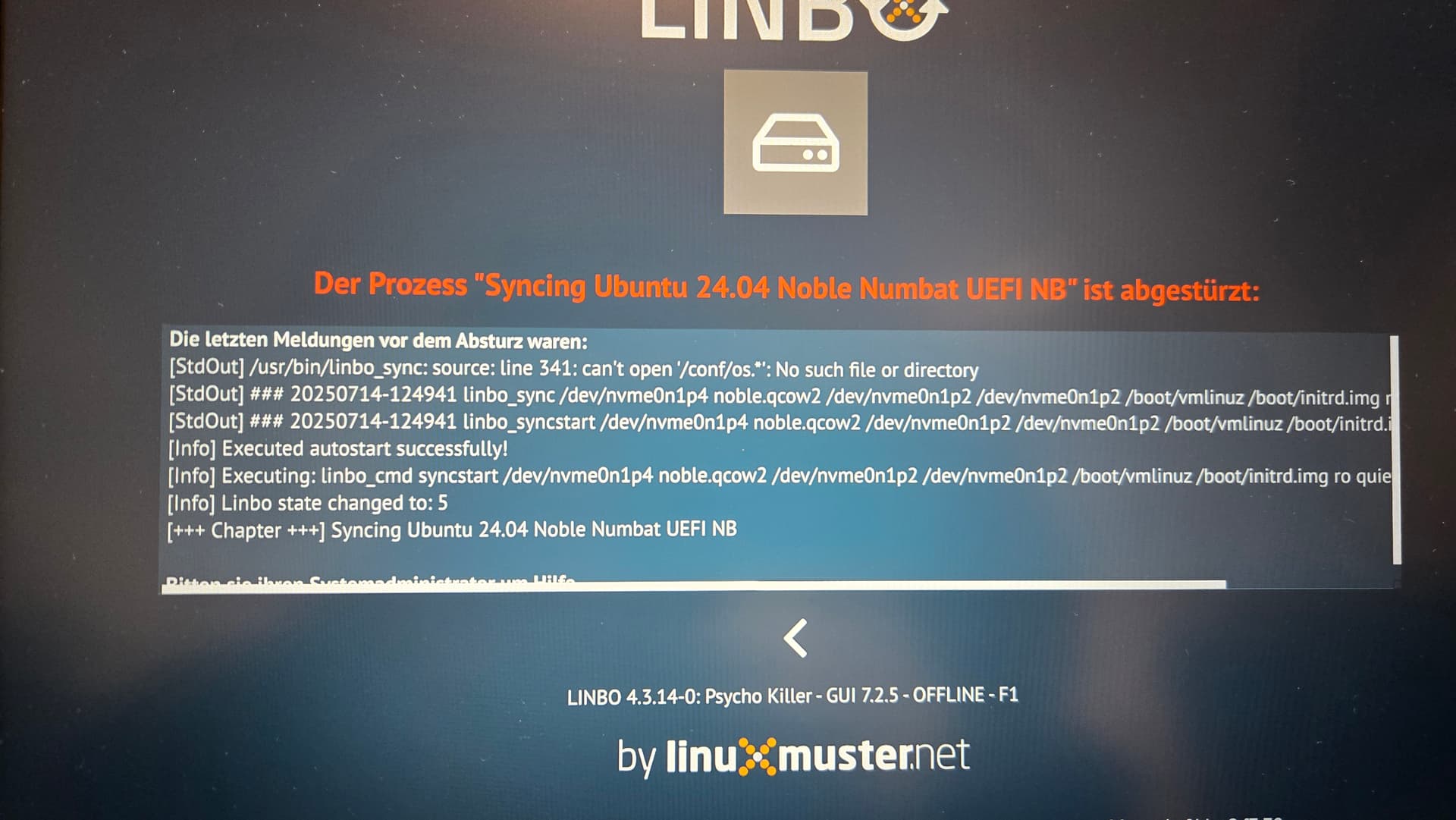
Ganz schlimm ist die Situation bei meinen 60 Wlan Clients, die mit 4.2 absolut perfekt funktioniert haben. Erstens ist es so, dass wenn kein Kabel drin steckt diese nach dem dhcp timeout keinerlei Bestrebungen haben den wpa_supplicant zu starten um eine Wlanverbindung aufzubauen. Da passiert rein gar nichts…das versuche ich später zu debuggen. Unter 4.2 hat das jedenfalls geklappt. Die Clients booten dann ins Linbo weiter und bleiben vor dem Sync mit einem Fehler stehen:

Ein erneuter Offlinestart landet immer genau an dieser Stelle. Offline sind die Clients also kaputt.

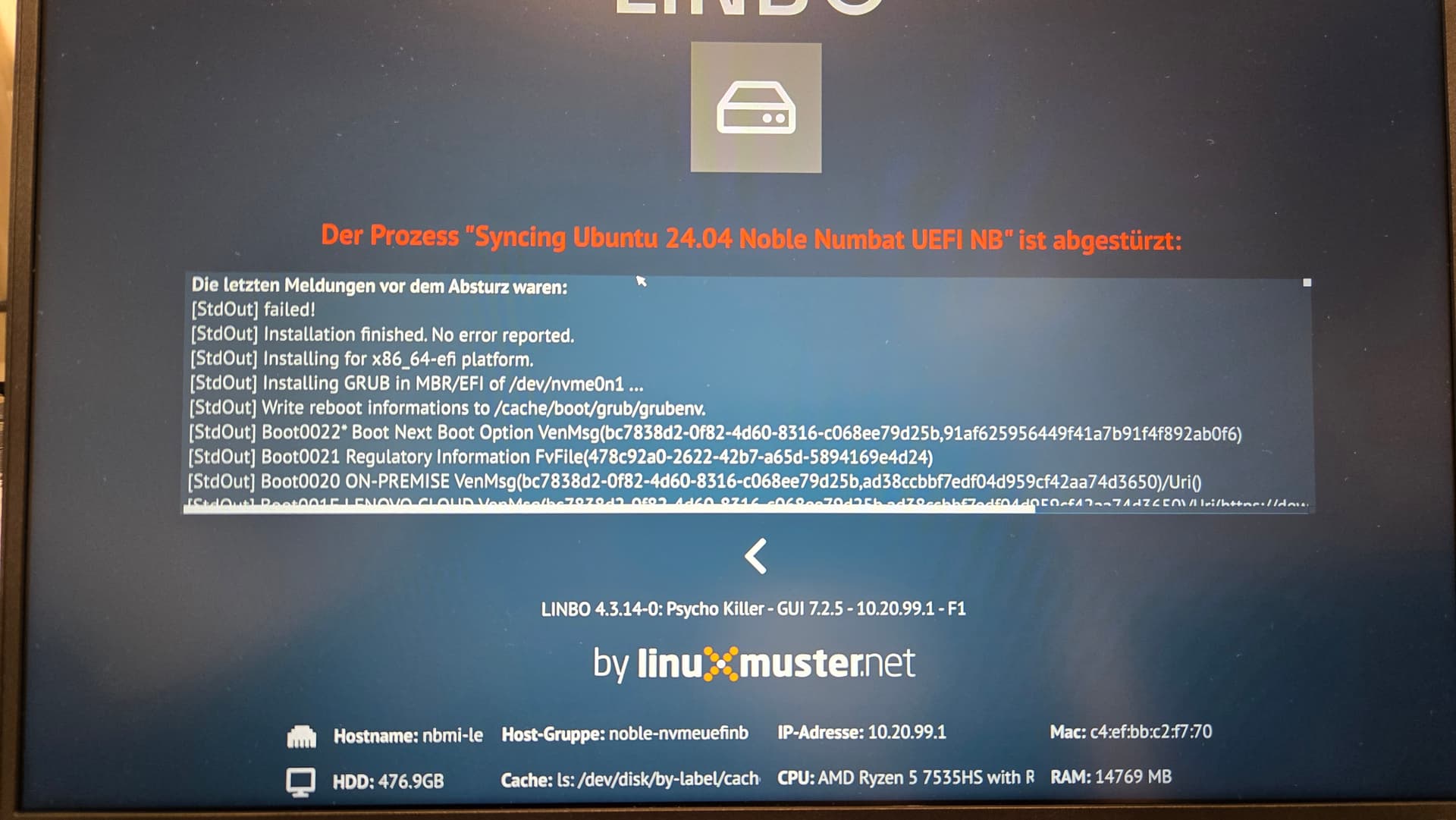
Ein Boot am LAN-Kabel endet nach dem Sync bei dem üblichen Fehler, allerdings mit einer leicht anderen Meldung:

Nach einem Reboot sind die Clients aber halb kaputt: die erste Fehlermeldung ist etwas mit no such device.... Danach kommt der Splashscreen von Ubuntu und der endet mit einer Rescue Shell (initramfs)~. Nach einem erzwungenen Neustart (der zweite Start nach dem Sync) bootet der Client dann plötzlich doch ohne jede Fehlermeldung ins Betriebssystem. Ohne forcegrub landen die Clients leider im Linbo-Sync-Loop.

Ich habe da jetzt mehrere Stunden investiert in denen ich alle möglichen Kombinationen versucht habe, bekomme die Clients aber nicht mehr dazu vernünftig zu funktionieren…das ist Mist…die werden am Mittwoch gebraucht. Wenn ich also keine Lösung finde muss ich spätestens morgen Abend zurück zu linbo 4.2.

Dritte Beobachtung:
Habe auf dem Server folgenden Befehl abgesetzt, um einen Testclient neu aufzusetzen:

linbo-remote -i hp-client-test -n -p partition,format,sync:1,start:1

Also partition und format ist ja eigentlich sogar doppelt gemoppelt. Danach den Rechner gestartet. Linbo meldet, dass es den Client partitioniert und dann formatiert, allerdings scheint das nicht zu funktionieren, da anschließend kein Image heruntergeladen wird, sondern direkt gesynct wird. Letztlich endet es dann in der üblichen Fehlermeldung.

Insgesamt schein Linbo noch ganz schön „kaputt“ zu sein :wink:.

VG
Dominik

Hallo Dominik,

zwei Phänomene bei dir kann ich vielleicht erklären.
Das sind diese beiden:
" In diesem Zusammenhang ist mir noch aufgefallen, dass nach einer Änderung an Linbo es bisher so war, dass beim nächsten Boot Linbo die neue Version geladen hat und dann in die neue Version rebootet hat. Jetzt ist es so, dass nach einer Änderung in Linbo, dieses bootet und dann ohne Aktion stehen bleibt und man manuell einen reboot anstoßen muss"

und dieses:

" Nach einem Reboot sind die Clients aber halb kaputt: die erste Fehlermeldung ist etwas mit no such device.... Danach kommt der Splashscreen von Ubuntu und der endet mit einer Rescue Shell (initramfs)~. Nach einem erzwungenen Neustart (der zweite Start nach dem Sync) bootet der Client dann plötzlich doch ohne jede Fehlermeldung ins Betriebssystem"

beides würde ich auf die Abwesenheit von
nowarmstart
schieben.
nowarmstart wirkte an zwei Stellen:

  1. wen linbo sich selbst upgradet (verändert)
  2. wenn ein linux gebootet wird

ich hab das extra sorum aufgezählt, weil ich glaube, das das auf die zwei Auswirkungen oben paßt (in dieser Reihenfolge).

LG

Holger

Hi Holger,

nowarmstart ist bei mir immer gesetzt, weil ca. 80% meiner Clients sonst nicht booten. Ich hatte weiter oben geschrieben, dass bei den Clients, bei denen warmstart funktioniert alles ohne Probleme klappt. Alle beschriebenen Probleme gibt es nur bei der Option nowarmstart.

LG

Dominik

Hallo Thomas,

sorry nochmal, dass du so viel lesen musst. Jetzt mal eine halbgute Nachricht. Wenn ich bei Linbo den stable Kernel (6.15.x) benutze, dann funktioniert das Wlan mit Linbo. Benutze ich den linbo 4.3er longterm Kernel (6.12.x) welcher ja der stable Kernel bei linbo 4.2 ist, dann wird die Wlankarte überhaupt nicht erkannt (lspci zeigt nichts), obwohl das unter 4.2 noch tat. Hast du da irgendwelche configs beim Kernelbau beim 4.3er longterm nicht gesetzt.

LG

Dominik

Hallo Dominik,

sorry: hatte nurnoch im Kopf, dass du meintest, du hättest nowarmstart raus genommen.

…nicht dass das noch in einer grub.cfg rumhängt …

LG
Holger

Die Kernelconfigs werden eigentlich immer mitgezogen. Allerdings macht make olddefconfig ggf. Anpassungen bei Updates. Um sicher zu gehen nehme ich beim nächsten Release die 6.12er config von 4.2.

VG, Thomas

Hallo Dominik,

In diesem Fall kommt das Problem von Samba: die Samba-Pakete sollten selber diese Abhängigkeit lösen.
Aber setproctitle gehört schon zu den Abhängigkeiten von Ajenti.
Ich gehe davon aus, dass das Requirements-Install von Ajenti nicht aufgerufen wurde, da es seit einige Zeit keine neue Version von Ajenti gab.

Wenn ja, dann sollten wir einfach un pip3 install -r PFAD/AJENTI/requirements.txt im Upgrade-Prozess hinzufügen.

Danke und Gruß

Arnaud